<?xml version="1.0" encoding="utf-8"?>
<feed xmlns="http://www.w3.org/2005/Atom">
    <id>https://docs.k3s.io/blog</id>
    <title>K3s Blog</title>
    <updated>2026-05-27T00:00:00.000Z</updated>
    <generator>https://github.com/jpmonette/feed</generator>
    <link rel="alternate" href="https://docs.k3s.io/blog"/>
    <subtitle>K3s Blog</subtitle>
    <icon>https://docs.k3s.io/img/favicon.ico</icon>
    <entry>
        <title type="html"><![CDATA[Kubernetes v1.36 is out!]]></title>
        <id>https://docs.k3s.io/blog/2026/05/27/K3s-1.36-release</id>
        <link href="https://docs.k3s.io/blog/2026/05/27/K3s-1.36-release"/>
        <updated>2026-05-27T00:00:00.000Z</updated>
        <summary type="html"><![CDATA[A deep dive into the latest K3s features, security enhancements, and community milestones]]></summary>
        <content type="html"><![CDATA[<p>Kubernetes 1.36 has officially landed! Following our continuous commitment to providing a lightweight yet production-grade Kubernetes distribution, the K3s team and community have put together another incredible milestone release. Here is what's new in the world of K3s.</p>
<h2 class="anchor anchorTargetStickyNavbar_Vzrq" id="key-features-and-improvements-">Key Features and Improvements ✨<a href="https://docs.k3s.io/blog/2026/05/27/K3s-1.36-release#key-features-and-improvements-" class="hash-link" aria-label="Direct link to Key Features and Improvements ✨" title="Direct link to Key Features and Improvements ✨" translate="no">​</a></h2>
<h3 class="anchor anchorTargetStickyNavbar_Vzrq" id="core-storage-evolution-etcd-36--sqlite-upgrades-">Core Storage Evolution: etcd 3.6 &amp; SQLite Upgrades 💾<a href="https://docs.k3s.io/blog/2026/05/27/K3s-1.36-release#core-storage-evolution-etcd-36--sqlite-upgrades-" class="hash-link" aria-label="Direct link to Core Storage Evolution: etcd 3.6 &amp; SQLite Upgrades 💾" title="Direct link to Core Storage Evolution: etcd 3.6 &amp; SQLite Upgrades 💾" translate="no">​</a></h3>
<p>We have officially upgraded our bundled etcd to the v3.6 series. While this brings large performance improvements and memory optimizations upstream, it introduces a critically important caveat for administrators running High Availability (HA) clusters: etcd v3.6 changes the data directory structure, which prevents a clean downgrade to v3.5 once your cluster has updated. If you ever need to rollback a v1.36 cluster to v1.35, you must follow specific manual snapshot restoration and node cleaning procedures. Be sure to review our dedicated migration guide before upgrading production environments.</p>
<h3 class="anchor anchorTargetStickyNavbar_Vzrq" id="revolutionizing-builds-with-the-nix-snapshotter-️">Revolutionizing Builds with the Nix Snapshotter ❄️<a href="https://docs.k3s.io/blog/2026/05/27/K3s-1.36-release#revolutionizing-builds-with-the-nix-snapshotter-%EF%B8%8F" class="hash-link" aria-label="Direct link to Revolutionizing Builds with the Nix Snapshotter ❄️" title="Direct link to Revolutionizing Builds with the Nix Snapshotter ❄️" translate="no">​</a></h3>
<p>In an exciting move for reproducibility and declarative environments, K3s now includes native support for the Nix snapshotter plugin. This integration allows users to leverage Nix store paths directly as container layers, opening the door for blazingly fast image provisioning and native NixOS container deployments within K3s clusters.</p>
<h3 class="anchor anchorTargetStickyNavbar_Vzrq" id="streamlined-runtimes-default-imports-to-containerd-base-templates-️">Streamlined Runtimes: Default Imports to Containerd Base Templates 🏗️<a href="https://docs.k3s.io/blog/2026/05/27/K3s-1.36-release#streamlined-runtimes-default-imports-to-containerd-base-templates-%EF%B8%8F" class="hash-link" aria-label="Direct link to Streamlined Runtimes: Default Imports to Containerd Base Templates 🏗️" title="Direct link to Streamlined Runtimes: Default Imports to Containerd Base Templates 🏗️" translate="no">​</a></h3>
<p>Customizing your container runtime configuration just got much easier. K3s now supports importing containerd configuration drop-ins. This architectural change allows administrators to modularly add configuration snippets that add to or replace configuration from the base file without having to extend or replace the entire default configuration template.</p>
<h3 class="anchor anchorTargetStickyNavbar_Vzrq" id="dynamic-security-secrets-encryption-for-existing-clusters-">Dynamic Security: Secrets Encryption for Existing Clusters 🔐<a href="https://docs.k3s.io/blog/2026/05/27/K3s-1.36-release#dynamic-security-secrets-encryption-for-existing-clusters-" class="hash-link" aria-label="Direct link to Dynamic Security: Secrets Encryption for Existing Clusters 🔐" title="Direct link to Dynamic Security: Secrets Encryption for Existing Clusters 🔐" translate="no">​</a></h3>
<p>Security is never static, and neither should your cluster configuration be. Historically, enabling at-rest Secrets Encryption required setting it up during the initial cluster bootstrapping phase. With v1.36, you can now enable secrets encryption on existing clusters without needing to recreate them, making it vastly easier to harden legacy deployments. You can also switch between encryption providers - both <code>aescbc</code> and <code>secretbox</code> are natively supported.</p>
<h3 class="anchor anchorTargetStickyNavbar_Vzrq" id="ai--hardware-acceleration-containerd-22-with-nri-support-">AI &amp; Hardware Acceleration: Containerd 2.2 with NRI Support 🚀<a href="https://docs.k3s.io/blog/2026/05/27/K3s-1.36-release#ai--hardware-acceleration-containerd-22-with-nri-support-" class="hash-link" aria-label="Direct link to AI &amp; Hardware Acceleration: Containerd 2.2 with NRI Support 🚀" title="Direct link to AI &amp; Hardware Acceleration: Containerd 2.2 with NRI Support 🚀" translate="no">​</a></h3>
<p>We have bumped our embedded container runtime to Containerd 2.2, which introduces out-of-the-box support for the Node Resource Interface (NRI). This is a game-changer for clusters running edge AI and heavy GPU workloads, enabling cleaner integration with the NVIDIA Container Toolkit and runtime-level device management.</p>
<h3 class="anchor anchorTargetStickyNavbar_Vzrq" id="language--api-stability-go-125--gateway-api-crds-">Language &amp; API Stability: Go 1.25 &amp; Gateway API CRDs 🤝<a href="https://docs.k3s.io/blog/2026/05/27/K3s-1.36-release#language--api-stability-go-125--gateway-api-crds-" class="hash-link" aria-label="Direct link to Language &amp; API Stability: Go 1.25 &amp; Gateway API CRDs 🤝" title="Direct link to Language &amp; API Stability: Go 1.25 &amp; Gateway API CRDs 🤝" translate="no">​</a></h3>
<p>K3s continues to pull in the latest performance and toolchain enhancements by building on Go 1.25. Additionally, we have adjusted our ingress defaults: if you choose to disable or remove the built-in Traefik ingress controller, K3s will now keep the Gateway API CRDs intact instead of cleaning them up. This ensures your custom ingress infrastructure won't break during adjustments, paving the way for bundled Gateway API CRDs coming natively in v1.37.</p>
<h2 class="anchor anchorTargetStickyNavbar_Vzrq" id="bug-fixes-and-notable-changes-️">Bug Fixes and Notable Changes 🛠️<a href="https://docs.k3s.io/blog/2026/05/27/K3s-1.36-release#bug-fixes-and-notable-changes-%EF%B8%8F" class="hash-link" aria-label="Direct link to Bug Fixes and Notable Changes 🛠️" title="Direct link to Bug Fixes and Notable Changes 🛠️" translate="no">​</a></h2>
<p>As always, we’ve ironed out numerous bugs under the hood. Here are the most impactful fixes included in this release:</p>
<ul>
<li class="">
<p><strong>Resilience &amp; etcd Cluster Hardening</strong>
This release eliminates critical race conditions during cluster expansion to guarantee that slow-responding nodes register reliably during initialization. It also patches edge-case bootstrap data bugs, allowing the cluster to recover quorum and reconcile smoothly even after sudden multi-node power failures. Finally, the process for transferring voting rights during dynamic member upgrades has been refined, successfully eliminating transient API timeouts.</p>
</li>
<li class="">
<p><strong>Core Networking &amp; Logic Fixes</strong>
To improve storage reliability, we resolved a subtle network synchronization issue that previously caused metric deadlocks during simultaneous multi-volume attachments. Additionally, internal certificate rotation tracking has been significantly hardened to prevent nodes from entering continuous reload loops if the system time is modified. K3s also resolves private dual-stack registration anomalies, eliminating unexpected node join delays in mixed IPv4/IPv6 topologies.</p>
</li>
</ul>
<h2 class="anchor anchorTargetStickyNavbar_Vzrq" id="version-bumps-for-key-components-">Version Bumps for Key Components 🚀<a href="https://docs.k3s.io/blog/2026/05/27/K3s-1.36-release#version-bumps-for-key-components-" class="hash-link" aria-label="Direct link to Version Bumps for Key Components 🚀" title="Direct link to Version Bumps for Key Components 🚀" translate="no">​</a></h2>
<table><thead><tr><th style="text-align:left">Component</th><th style="text-align:left">New Version</th></tr></thead><tbody><tr><td style="text-align:left">Kine</td><td style="text-align:left">v0.14.14</td></tr><tr><td style="text-align:left">SQLite</td><td style="text-align:left">v3.51.2</td></tr><tr><td style="text-align:left">Etcd</td><td style="text-align:left">v3.6.7</td></tr><tr><td style="text-align:left">Containerd</td><td style="text-align:left">v2.2.2</td></tr><tr><td style="text-align:left">Runc</td><td style="text-align:left">v1.4.1</td></tr><tr><td style="text-align:left">Flannel</td><td style="text-align:left">v0.28.2</td></tr><tr><td style="text-align:left">Metrics-server</td><td style="text-align:left">v0.8.1</td></tr><tr><td style="text-align:left">Traefik</td><td style="text-align:left">v3.6.10</td></tr><tr><td style="text-align:left">Coredns</td><td style="text-align:left">v1.14.2</td></tr><tr><td style="text-align:left">Helm-controller</td><td style="text-align:left">v0.16.17</td></tr><tr><td style="text-align:left">Local-path-provisioner</td><td style="text-align:left">v0.0.35</td></tr></tbody></table>
<h2 class="anchor anchorTargetStickyNavbar_Vzrq" id="special-thanks-to-our-contributors-">Special Thanks to Our Contributors 🙏<a href="https://docs.k3s.io/blog/2026/05/27/K3s-1.36-release#special-thanks-to-our-contributors-" class="hash-link" aria-label="Direct link to Special Thanks to Our Contributors 🙏" title="Direct link to Special Thanks to Our Contributors 🙏" translate="no">​</a></h2>
<p>We are incredibly grateful to our community members who contributed key improvements, rigorous testing, and code during this cycle. A massive thank you to:</p>
<p>@Ada, @CharlieTonnesla, @DT1mote, @FabianoFidêncio, @JonHermansen, @MichaelMoll, @RahulRai, @RicardoNoriega, @TomRisse, and @zijiren</p>
<p>Your passion and hard work are what push K3s forward!</p>
<h2 class="anchor anchorTargetStickyNavbar_Vzrq" id="join-our-adopters-list-">Join our Adopters list 💎<a href="https://docs.k3s.io/blog/2026/05/27/K3s-1.36-release#join-our-adopters-list-" class="hash-link" aria-label="Direct link to Join our Adopters list 💎" title="Direct link to Join our Adopters list 💎" translate="no">​</a></h2>
<p>If K3s is making your life easier, the best way to say "thanks" is to add your company to our official Adopters list. It’s a tiny gesture that carries a lot of weight for the project's health and visibility within the CNCF ecosystem. We are currently working hard to get our 'status' inside the CNCF to progress and showing a large list of Adopters would help tremendously.</p>
<p>The task is easy: create a PR that adds your name in <a href="https://github.com/k3s-io/k3s/blob/main/ADOPTERS.md" target="_blank" rel="noopener noreferrer" class="">https://github.com/k3s-io/k3s/blob/main/ADOPTERS.md</a>.</p>
<p>Thanks a lot!</p>]]></content>
        <author>
            <name>Manuel Buil</name>
            <uri>https://github.com/manuelbuil</uri>
        </author>
    </entry>
    <entry>
        <title type="html"><![CDATA[Project K3s at KubeCon + CloudNativeCon Europe 2026 in Amsterdam]]></title>
        <id>https://docs.k3s.io/blog/2026/03/16/K3s-KubeCon-EU-2026</id>
        <link href="https://docs.k3s.io/blog/2026/03/16/K3s-KubeCon-EU-2026"/>
        <updated>2026-03-16T00:00:00.000Z</updated>
        <summary type="html"><![CDATA[K3s team at KubeCon Europe 2026]]></summary>
        <content type="html"><![CDATA[<p>The cloud-native community is heading to Amsterdam for <strong>KubeCon + CloudNativeCon Europe 2026</strong>, and <strong>Project K3s</strong> is excited to be part of the action! As one of the most widely adopted lightweight Kubernetes distributions, K3s continues to empower edge, IoT, and resource-constrained environments across industries.</p>
<p>From satellites to smart farming, K3s is proving that Kubernetes can run anywhere — and this year’s KubeCon is packed with sessions that highlight exactly that.</p>
<h1>K3s at KubeCon Europe 2026</h1>
<p>Whether you're a long-time user or just discovering K3s, there are plenty of opportunities to learn, connect, and contribute during the event.</p>
<h2 class="anchor anchorTargetStickyNavbar_Vzrq" id="lightning-talk">Lightning Talk<a href="https://docs.k3s.io/blog/2026/03/16/K3s-KubeCon-EU-2026#lightning-talk" class="hash-link" aria-label="Direct link to Lightning Talk" title="Direct link to Lightning Talk" translate="no">​</a></h2>
<p>K3s will be featured in a <strong>Lightning Talk</strong>, delivering a fast-paced update on the project and its latest innovations.</p>
<p><strong>Project Lightning Talk – K3s</strong><br>
<!-- -->📅 Monday, March 23, 2026<br>
<!-- -->🕒 14:22 – 14:27 CET<br>
<!-- -->📍 Elicium<br>
<!-- -->🎤 Speaker: Manuel Buil, Maintainer, SUSE</p>
<p><a href="https://sched.co/2EFyQ" target="_blank" rel="noopener noreferrer" class="">View session details</a></p>
<p>Expect a concise overview of how K3s continues to evolve and support modern cloud-native workloads at the edge and beyond.</p>
<h2 class="anchor anchorTargetStickyNavbar_Vzrq" id="-contribfest-k3s-session">🚨 ContribFest: K3s Session<a href="https://docs.k3s.io/blog/2026/03/16/K3s-KubeCon-EU-2026#-contribfest-k3s-session" class="hash-link" aria-label="Direct link to 🚨 ContribFest: K3s Session" title="Direct link to 🚨 ContribFest: K3s Session" translate="no">​</a></h2>
<p>Want to get hands-on with K3s and contribute to the project? Don’t miss the <strong>K3s ContribFest Session</strong>!</p>
<p><strong>K3s ContribFest Session</strong><br>
<!-- -->📅 Wednesday, March 25, 2026<br>
<!-- -->🕒 14:15 – 15:30 CET<br>
<!-- -->📍 Room G107<br>
<!-- -->🎤 Manuel Buil (SUSE) &amp; Orlin Vasilev (SAP)</p>
<p><a href="https://sched.co/2EF7m" target="_blank" rel="noopener noreferrer" class="">Join the session</a></p>
<p>This interactive session is perfect for:</p>
<ul>
<li class="">New contributors looking to get started</li>
<li class="">Developers interested in K3s internals</li>
<li class="">Users who want to give back to the community</li>
<li class="">Anyone curious about how open source collaboration works in practice</li>
</ul>
<h2 class="anchor anchorTargetStickyNavbar_Vzrq" id="k3s-in-the-wild-must-see-talks">K3s in the Wild: Must-See Talks<a href="https://docs.k3s.io/blog/2026/03/16/K3s-KubeCon-EU-2026#k3s-in-the-wild-must-see-talks" class="hash-link" aria-label="Direct link to K3s in the Wild: Must-See Talks" title="Direct link to K3s in the Wild: Must-See Talks" translate="no">​</a></h2>
<p>K3s continues to shine in real-world use cases across edge computing, AI, and distributed systems. Here are some exciting sessions where K3s plays a role:</p>
<h3 class="anchor anchorTargetStickyNavbar_Vzrq" id="-edge-computing-in-space">🚀 Edge Computing in Space<a href="https://docs.k3s.io/blog/2026/03/16/K3s-KubeCon-EU-2026#-edge-computing-in-space" class="hash-link" aria-label="Direct link to 🚀 Edge Computing in Space" title="Direct link to 🚀 Edge Computing in Space" translate="no">​</a></h3>
<p><strong>Bringing Cloud Native PaaS to Space: Onboard Edge Computing for Satellites</strong><br>
<!-- -->Speakers: Adèle Karam-Hankache &amp; Sergiu Weisz<br>
<a href="https://kccnceu2026.sched.com/event/2CVyc/bringing-cloud-native-paas-to-space-onboard-edge-computing-for-satellites-adele-karam-hankache-thales-alenia-space-sergiu-weisz-politehnica-bucharest?iframe=no&amp;w=100%25&amp;sidebar=yes&amp;bg=no" target="_blank" rel="noopener noreferrer" class="">Watch session</a></p>
<h3 class="anchor anchorTargetStickyNavbar_Vzrq" id="-kubernetes-on-tractors">🚜 Kubernetes on Tractors<a href="https://docs.k3s.io/blog/2026/03/16/K3s-KubeCon-EU-2026#-kubernetes-on-tractors" class="hash-link" aria-label="Direct link to 🚜 Kubernetes on Tractors" title="Direct link to 🚜 Kubernetes on Tractors" translate="no">​</a></h3>
<p><strong>Cloud Native at the Farm Edge: Running Kubernetes and AI on Tractors</strong><br>
<!-- -->Speakers: Mauro Morales &amp; Jordan Karapanagiotis<br>
<a href="https://kccnceu2026.sched.com/event/2CW75/cloud-native-at-the-farm-edge-running-kubernetes-and-ai-on-tractors-mauro-morales-spectro-cloud-jordan-karapanagiotis-aurea-imaging?iframe=no&amp;w=100%25&amp;sidebar=yes&amp;bg=no" target="_blank" rel="noopener noreferrer" class="">Watch session</a></p>
<h3 class="anchor anchorTargetStickyNavbar_Vzrq" id="-multi-tenancy--isolation">🏰 Multi-Tenancy &amp; Isolation<a href="https://docs.k3s.io/blog/2026/03/16/K3s-KubeCon-EU-2026#-multi-tenancy--isolation" class="hash-link" aria-label="Direct link to 🏰 Multi-Tenancy &amp; Isolation" title="Direct link to 🏰 Multi-Tenancy &amp; Isolation" translate="no">​</a></h3>
<p><strong>Three Shades of Isolation: A Multi-Tenancy Fortress</strong><br>
<!-- -->Speakers: Braulio Dumba &amp; Paolo Dettori<br>
<a href="https://kccnceu2026.sched.com/event/2CW7T/three-shades-of-isolation-a-multi-tenancy-fortress-braulio-dumba-paolo-dettori-ibm?iframe=no&amp;w=100%25&amp;sidebar=yes&amp;bg=no" target="_blank" rel="noopener noreferrer" class="">Watch session</a></p>
<h3 class="anchor anchorTargetStickyNavbar_Vzrq" id="️-platform-engineering-evolution">⚙️ Platform Engineering Evolution<a href="https://docs.k3s.io/blog/2026/03/16/K3s-KubeCon-EU-2026#%EF%B8%8F-platform-engineering-evolution" class="hash-link" aria-label="Direct link to ⚙️ Platform Engineering Evolution" title="Direct link to ⚙️ Platform Engineering Evolution" translate="no">​</a></h3>
<p><strong>Platform Engineering 2.0: Just Enough Kubernetes and AI-Native DevOps</strong><br>
<!-- -->Speaker: Shweta Vohra<br>
<a href="https://kccnceu2026.sched.com/event/2CW80/platform-engineering-20-just-enough-kubernetes-and-ai-native-devops-shweta-vohra-bookingcom?iframe=no&amp;w=100%25&amp;sidebar=yes&amp;bg=no" target="_blank" rel="noopener noreferrer" class="">Watch session</a></p>
<p>These talks showcase how K3s is enabling innovation in environments where traditional Kubernetes would be too heavy or complex.</p>
<h3 class="anchor anchorTargetStickyNavbar_Vzrq" id="️-open--accessible-cloud">☁️ Open &amp; Accessible Cloud<a href="https://docs.k3s.io/blog/2026/03/16/K3s-KubeCon-EU-2026#%EF%B8%8F-open--accessible-cloud" class="hash-link" aria-label="Direct link to ☁️ Open &amp; Accessible Cloud" title="Direct link to ☁️ Open &amp; Accessible Cloud" translate="no">​</a></h3>
<p><strong>Krafting the Cloud: Building a Free, Open, and Accessible Cloud</strong><br>
<!-- -->Speaker: Alex Bissessur<br>
<a href="https://kccnceu2026.sched.com/event/2CW4l/cl-lightning-talk-krafting-the-cloud-building-a-free-open-and-accessible-cloud-alex-bissessur-la-sentinelle?iframe=no&amp;w=100%25&amp;sidebar=yes&amp;bg=no" target="_blank" rel="noopener noreferrer" class="">Watch session</a></p>
<h2 class="anchor anchorTargetStickyNavbar_Vzrq" id="panel-discussion">Panel Discussion<a href="https://docs.k3s.io/blog/2026/03/16/K3s-KubeCon-EU-2026#panel-discussion" class="hash-link" aria-label="Direct link to Panel Discussion" title="Direct link to Panel Discussion" translate="no">​</a></h2>
<p>K3s is also represented in broader CNCF conversations around security and project sustainability.</p>
<p><strong>Strengthening CNCF Projects: Impact of Security Self-Assessments</strong><br>
<!-- -->🎤 Featuring Orlin Vasilev and other industry experts</p>
<p><a href="https://kccnceu2026.sched.com/event/2EF6x/strengthening-cncf-projects-impact-of-security-self-assessments-eddie-knight-sonatype-bradley-andersen-k8gb-justin-cappos-new-york-university-shuting-zhao-nirmata-orlin-vasilev-suse?iframe=no&amp;w=100%25&amp;sidebar=yes&amp;bg=no" target="_blank" rel="noopener noreferrer" class="">View panel details</a></p>
<p>This panel dives into how CNCF projects, including K3s, are improving security practices and building trust across the ecosystem.</p>
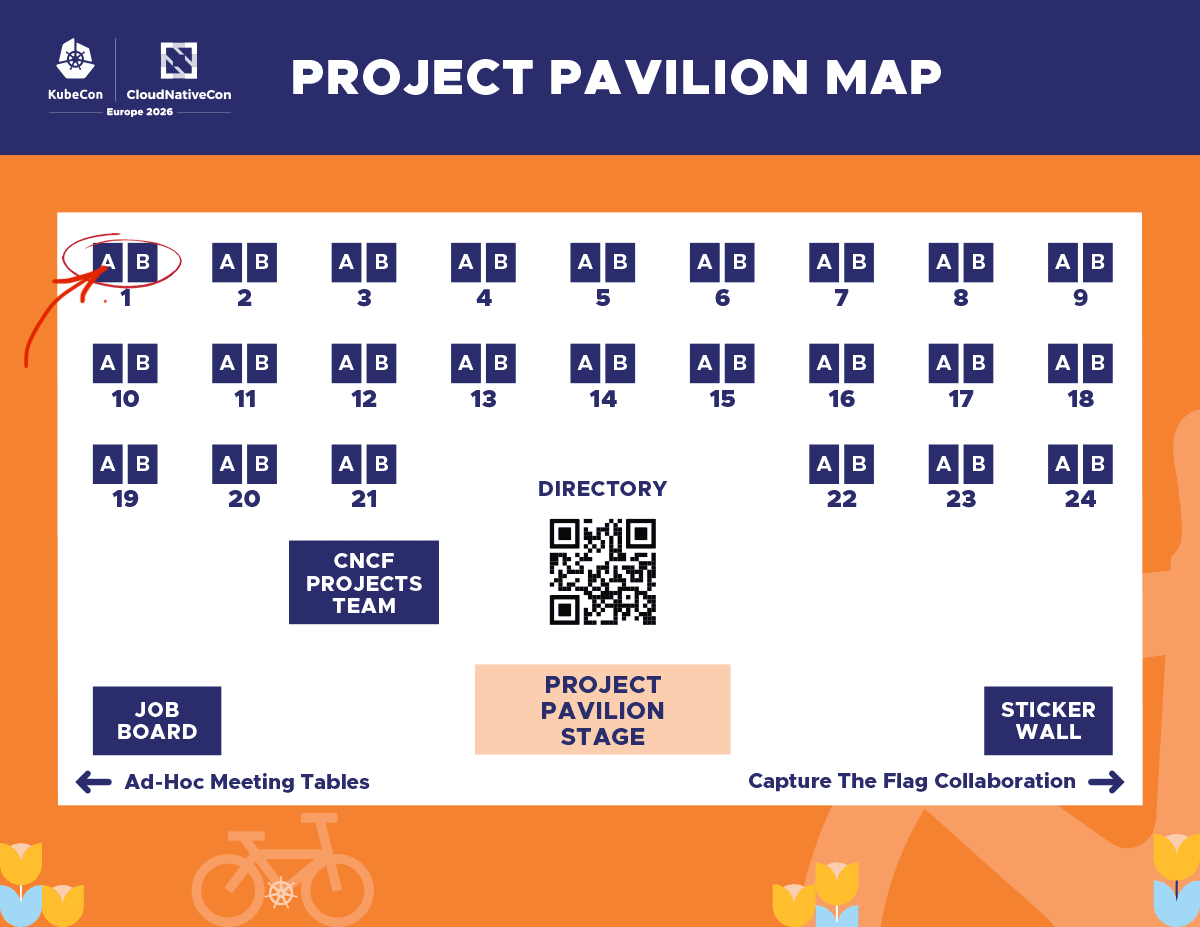
<h3 class="anchor anchorTargetStickyNavbar_Vzrq" id="find-k3s-at-the-project-pavilion">Find K3s at the Project Pavilion<a href="https://docs.k3s.io/blog/2026/03/16/K3s-KubeCon-EU-2026#find-k3s-at-the-project-pavilion" class="hash-link" aria-label="Direct link to Find K3s at the Project Pavilion" title="Direct link to Find K3s at the Project Pavilion" translate="no">​</a></h3>
<p>Stop by the K3s kiosk at <strong>booth P-1A</strong> during the following times:</p>
<p><strong>Wednesday:</strong> 10:00 – 13:30<br>
<strong>Thursday:</strong> 10:00 – 12:00</p>
<p>Come chat with contributors, ask questions, and learn more about K3s in real-world use cases!</p>
<p>Don’t forget to explore the <strong>Project Pavilion</strong>, where CNCF projects come together to showcase their work and connect with the community.</p>
<p>Learn more:<br>
<a href="https://events.linuxfoundation.org/kubecon-cloudnativecon-europe/features-add-ons/project-engagement/" target="_blank" rel="noopener noreferrer" class="">https://events.linuxfoundation.org/kubecon-cloudnativecon-europe/features-add-ons/project-engagement/</a></p>
<p>While K3s may appear across multiple booths and partner ecosystems, this is the perfect place to:</p>
<ul>
<li class="">Meet contributors and maintainers</li>
<li class="">Discover integrations and real-world use cases</li>
<li class="">Ask questions about running K3s in production</li>
<li class="">Explore ways to get involved</li>
</ul>
<p><img decoding="async" loading="lazy" alt="Project Pavilion Map – K3s Location" src="https://docs.k3s.io/assets/images/kubecon-eu-2026-project-pavilion-map-70594056e73841e810ee63f3c9a98970.png" width="1200" height="927" class="img_ev3q"></p>
<h2 class="anchor anchorTargetStickyNavbar_Vzrq" id="join-the-k3s-community">Join the K3s Community<a href="https://docs.k3s.io/blog/2026/03/16/K3s-KubeCon-EU-2026#join-the-k3s-community" class="hash-link" aria-label="Direct link to Join the K3s Community" title="Direct link to Join the K3s Community" translate="no">​</a></h2>
<p>K3s has grown into one of the most impactful Kubernetes distributions thanks to its vibrant and welcoming community. Whether you're running clusters at the edge, in the cloud, or somewhere entirely unexpected — there’s a place for you in the K3s ecosystem.</p>
<p>KubeCon is the perfect opportunity to:</p>
<ul>
<li class="">Meet fellow K3s users and contributors</li>
<li class="">Share your use cases and experiences</li>
<li class="">Learn from real-world deployments</li>
<li class="">Start contributing to the project</li>
</ul>
<h2 class="anchor anchorTargetStickyNavbar_Vzrq" id="see-you-in-amsterdam">See You in Amsterdam!<a href="https://docs.k3s.io/blog/2026/03/16/K3s-KubeCon-EU-2026#see-you-in-amsterdam" class="hash-link" aria-label="Direct link to See You in Amsterdam!" title="Direct link to See You in Amsterdam!" translate="no">​</a></h2>
<p>We’re excited to connect with the global cloud-native community and showcase how K3s continues to push the boundaries of Kubernetes.</p>
<p>If you're passionate about <strong>edge computing, lightweight Kubernetes, and open source collaboration</strong>, don’t miss the K3s sessions at KubeCon Europe 2026.</p>
<p><strong>See you in Amsterdam!</strong></p>
<p><a href="https://events.linuxfoundation.org/kubecon-cloudnativecon-europe/" target="_blank" rel="noopener noreferrer" class=""><em>For more details and to register for KubeCon + CloudNativeCon Europe 2026, visit the official event page.</em></a></p>
<p><a href="https://www.linkedin.com/in/orlinvasilev/" target="_blank" rel="noopener noreferrer" class="">Orlin Vasilev</a><br>
<!-- -->K3s Community Manager</p>]]></content>
        <author>
            <name>orlix</name>
        </author>
    </entry>
    <entry>
        <title type="html"><![CDATA[Kubernetes v1.35 is out!]]></title>
        <id>https://docs.k3s.io/blog/2026/01/15/K3s-1.35-release</id>
        <link href="https://docs.k3s.io/blog/2026/01/15/K3s-1.35-release"/>
        <updated>2026-01-15T00:00:00.000Z</updated>
        <summary type="html"><![CDATA[A deep dive into the latest K3s features, security enhancements, and community milestones]]></summary>
        <content type="html"><![CDATA[<p>Kubernetes 1.35 has arrived! As we roll out this latest version, it’s the perfect time to reflect on the significant strides the K3s project has made over the last quarter. 🥳</p>
<p>Our focus this release was on stability. We know that our users value a platform that remains consistent and reliable year over year. From major security milestones to core language upgrades, here is what’s new in the world of K3s.</p>
<h2 class="anchor anchorTargetStickyNavbar_Vzrq" id="key-features-and-improvements-">Key Features and Improvements ✨<a href="https://docs.k3s.io/blog/2026/01/15/K3s-1.35-release#key-features-and-improvements-" class="hash-link" aria-label="Direct link to Key Features and Improvements ✨" title="Direct link to Key Features and Improvements ✨" translate="no">​</a></h2>
<h4 class="anchor anchorTargetStickyNavbar_Vzrq" id="modular-executor-interface--cni-startup-️">Modular Executor Interface &amp; CNI Startup 🏗️<a href="https://docs.k3s.io/blog/2026/01/15/K3s-1.35-release#modular-executor-interface--cni-startup-%EF%B8%8F" class="hash-link" aria-label="Direct link to Modular Executor Interface &amp; CNI Startup 🏗️" title="Direct link to Modular Executor Interface &amp; CNI Startup 🏗️" translate="no">​</a></h4>
<p>One of the most significant architectural improvements in this release is the refactoring of the Executor interface. By making CNI startup a first-class part of this interface, we have removed reliance on "CLI flag hacks" and direct dependencies on networking providers like Flannel or Kube-router. This decoupling makes K3s more modular and significantly easier to integrate into diverse platforms and distributions.</p>
<h4 class="anchor anchorTargetStickyNavbar_Vzrq" id="embedded-kine-metrics-">Embedded Kine Metrics 📊<a href="https://docs.k3s.io/blog/2026/01/15/K3s-1.35-release#embedded-kine-metrics-" class="hash-link" aria-label="Direct link to Embedded Kine Metrics 📊" title="Direct link to Embedded Kine Metrics 📊" translate="no">​</a></h4>
<p>Visibility into your database layer just got a lot better. We’ve enabled embedded metrics for Kine, allowing you to monitor the performance of your external database (like PostgreSQL or MySQL) directly through the K3s metrics endpoint. This is essential for debugging latency at the storage layer before it impacts your workloads.</p>
<h4 class="anchor anchorTargetStickyNavbar_Vzrq" id="node-password-secrets-">Node Password Secrets 🔐<a href="https://docs.k3s.io/blog/2026/01/15/K3s-1.35-release#node-password-secrets-" class="hash-link" aria-label="Direct link to Node Password Secrets 🔐" title="Direct link to Node Password Secrets 🔐" translate="no">​</a></h4>
<p>Security and automation take a step forward with the evolution of the Node Password Secrets. Instead of using the generic <code>opaque</code> type, we use a custom type. This allows the node password secret controller to only watch node password secrets instead of all secrets, which improves resource utilization and increases responsiveness in larger clusters. Node password secrets are also now automatically cleaned up if node registration fails, instead of leaving orphaned secrets.</p>
<h4 class="anchor anchorTargetStickyNavbar_Vzrq" id="security-self-assessment-️">Security Self-Assessment 🛡️<a href="https://docs.k3s.io/blog/2026/01/15/K3s-1.35-release#security-self-assessment-%EF%B8%8F" class="hash-link" aria-label="Direct link to Security Self-Assessment 🛡️" title="Direct link to Security Self-Assessment 🛡️" translate="no">​</a></h4>
<p>As part of our commitment to excellence, we have completed a comprehensive Security Self-Assessment. This deep dive into our architecture and processes ensures that K3s continues to meet the highest standards for production environments, providing a clear roadmap for how we protect your data. <a href="https://github.com/cncf/toc/pull/1986" target="_blank" rel="noopener noreferrer" class="">link</a></p>
<h4 class="anchor anchorTargetStickyNavbar_Vzrq" id="language-evolution-go-125-">Language Evolution: Go 1.25 🚀<a href="https://docs.k3s.io/blog/2026/01/15/K3s-1.35-release#language-evolution-go-125-" class="hash-link" aria-label="Direct link to Language Evolution: Go 1.25 🚀" title="Direct link to Language Evolution: Go 1.25 🚀" translate="no">​</a></h4>
<p>K3s is now built with <strong>Go 1.25</strong>. This brings the latest performance optimizations and security patches to the K3s binary, ensuring that our "default" remains the most efficient way to run Kubernetes.</p>
<h4 class="anchor anchorTargetStickyNavbar_Vzrq" id="inclusive-naming-migration-">Inclusive Naming Migration 🤝<a href="https://docs.k3s.io/blog/2026/01/15/K3s-1.35-release#inclusive-naming-migration-" class="hash-link" aria-label="Direct link to Inclusive Naming Migration 🤝" title="Direct link to Inclusive Naming Migration 🤝" translate="no">​</a></h4>
<p>Words matter. We have officially transitioned our primary branch naming from <code>master</code> to <code>main</code> and updated internal references to align with <a href="https://www.cncf.io/announcements/2021/10/13/inclusive-naming-initiative-announces-new-community-resources-for-a-more-inclusive-future/" target="_blank" rel="noopener noreferrer" class="">inclusive naming standards</a>. This ensures our codebase remains welcoming to all developers who wish to contribute.</p>
<p>You can find more information on what v1.35 brought upstream in this cool <a href="https://kubernetes.io/blog/2025/12/17/kubernetes-v1-35-release/" target="_blank" rel="noopener noreferrer" class="">blog post</a></p>
<h2 class="anchor anchorTargetStickyNavbar_Vzrq" id="bug-fixes-and-notable-changes-️">Bug Fixes and Notable Changes 🛠️<a href="https://docs.k3s.io/blog/2026/01/15/K3s-1.35-release#bug-fixes-and-notable-changes-%EF%B8%8F" class="hash-link" aria-label="Direct link to Bug Fixes and Notable Changes 🛠️" title="Direct link to Bug Fixes and Notable Changes 🛠️" translate="no">​</a></h2>
<p>As always, there were a lot of bug fixes and here, are the most impactful:</p>
<ul>
<li class=""><strong>Networking &amp; Dual-Stack Resilience:</strong> We've pushed several fixes to stabilize complex networking setups. This includes corrected IPv6 handling for LoadBalancer addresses, resolving fatal errors in Network Policies (NetPol) when node IPs change, and hardening our Tailscale integration to handle pre-existing configurations more gracefully.</li>
<li class=""><strong>Reliable HA Cluster Management:</strong> Resolved critical edge-case bugs related to etcd member promotion and bootstrap data reconciliation. This ensures that when etcd members join or leave, or are restarted, the quorum remains stable and the promotion process is seamless.</li>
<li class=""><strong>CI Pipeline Migration:</strong> We successfully migrated the K3s Pull Request and Release CI pipelines from Drone to GitHub Actions, increasing transparency and ensuring the continuity of our build process for years to come.</li>
</ul>
<h2 class="anchor anchorTargetStickyNavbar_Vzrq" id="version-bumps-for-key-components-">Version Bumps for Key Components 🚀<a href="https://docs.k3s.io/blog/2026/01/15/K3s-1.35-release#version-bumps-for-key-components-" class="hash-link" aria-label="Direct link to Version Bumps for Key Components 🚀" title="Direct link to Version Bumps for Key Components 🚀" translate="no">​</a></h2>
<table><thead><tr><th style="text-align:left">Component</th><th style="text-align:left">New Version</th></tr></thead><tbody><tr><td style="text-align:left">Kine</td><td style="text-align:left">v0.14.9</td></tr><tr><td style="text-align:left">SQLite</td><td style="text-align:left">v3.50.4</td></tr><tr><td style="text-align:left">Etcd</td><td style="text-align:left">v3.6.6</td></tr><tr><td style="text-align:left">Containerd</td><td style="text-align:left">v2.1.5</td></tr><tr><td style="text-align:left">Runc</td><td style="text-align:left">v1.4.0</td></tr><tr><td style="text-align:left">Flannel</td><td style="text-align:left">v0.27.4</td></tr><tr><td style="text-align:left">Metrics-server</td><td style="text-align:left">v0.8.0</td></tr><tr><td style="text-align:left">Traefik</td><td style="text-align:left">v3.5.1</td></tr><tr><td style="text-align:left">Coredns</td><td style="text-align:left">v1.13.1</td></tr><tr><td style="text-align:left">Helm-controller</td><td style="text-align:left">v0.16.17</td></tr><tr><td style="text-align:left">Local-path-provisioner</td><td style="text-align:left">v0.0.32</td></tr></tbody></table>
<h2 class="anchor anchorTargetStickyNavbar_Vzrq" id="special-thanks-to-our-contributors-">Special Thanks to Our Contributors 🙏<a href="https://docs.k3s.io/blog/2026/01/15/K3s-1.35-release#special-thanks-to-our-contributors-" class="hash-link" aria-label="Direct link to Special Thanks to Our Contributors 🙏" title="Direct link to Special Thanks to Our Contributors 🙏" translate="no">​</a></h2>
<p>We are incredibly grateful to our community members who contributed key improvements during this cycle. A massive thank you to:</p>
<p><strong>@systemj</strong>, <strong>@farazkhawaja</strong>, <strong>@AshiqN</strong>, <strong>@rorosen</strong>, <strong>@xelus22</strong>, <strong>@jvassev</strong></p>
<h2 class="anchor anchorTargetStickyNavbar_Vzrq" id="join-our-adopters-list-">Join our Adopters list 💎<a href="https://docs.k3s.io/blog/2026/01/15/K3s-1.35-release#join-our-adopters-list-" class="hash-link" aria-label="Direct link to Join our Adopters list 💎" title="Direct link to Join our Adopters list 💎" translate="no">​</a></h2>
<p>If K3s is making your life easier, the best way to say "thanks" is to add your company to our official Adopters list. It’s a tiny gesture that carries a lot of weight for the project's health and visibility within the CNCF ecosystem. We are currently working hard to get our 'status' inside the CNCF to progress and showing a large list of Adopters would help tremendously.</p>
<p>The task is easy: create a PR that adds your name in <a href="https://github.com/k3s-io/k3s/blob/main/ADOPTERS.md" target="_blank" rel="noopener noreferrer" class="">https://github.com/k3s-io/k3s/blob/main/ADOPTERS.md</a>.</p>
<p>Thanks a lot!</p>]]></content>
        <author>
            <name>Manuel Buil</name>
            <uri>https://github.com/manuelbuil</uri>
        </author>
    </entry>
    <entry>
        <title type="html"><![CDATA[K3s strategies for image consumption]]></title>
        <id>https://docs.k3s.io/blog/2025/11/11/strategies-for-large-images</id>
        <link href="https://docs.k3s.io/blog/2025/11/11/strategies-for-large-images"/>
        <updated>2025-11-11T00:00:00.000Z</updated>
        <summary type="html"><![CDATA[Master online and offline image loading techniques in K3s for ultra-fast application startup, even with multi-gigabyte containers.]]></summary>
        <content type="html"><![CDATA[<p>Slow image pulls can be annoying and may increase Kubernetes startup times over a healthy threshold, particularly in resource-constrained or air-gapped environments. The situation is exacerbated by new AI-driven apps, which often rely on astronomically large images, frequently tens or hundreds of gigabytes. This post dives into mechanisms that K3s makes available to improve the user's experience when handling large images.</p>
<h2 class="anchor anchorTargetStickyNavbar_Vzrq" id="online--offline-strategies-the-power-of-local-import-">Online &amp; Offline Strategies: The Power of Local Import 📦<a href="https://docs.k3s.io/blog/2025/11/11/strategies-for-large-images#online--offline-strategies-the-power-of-local-import-" class="hash-link" aria-label="Direct link to Online &amp; Offline Strategies: The Power of Local Import 📦" title="Direct link to Online &amp; Offline Strategies: The Power of Local Import 📦" translate="no">​</a></h2>
<p>K3s provides mechanisms for ensuring large images are available quickly, that address two common scenarios:</p>
<ul>
<li class="">Online Clusters: To avoid slow image pulls from an external registry when a pod starts, K3s can <code>pre-pull</code> images from a manifest file.</li>
<li class="">Offline (Air-Gapped) Clusters: Where no external registry is available, K3s can <code>import</code> images directly from local tarball archives.</li>
</ul>
<ol>
<li class="">Pre-Pulling Images via a Manifest File (Online)
In scenarios with internet connectivity, the goal is to initiate image pulls as early and efficiently as possible. K3s can be instructed to sequentially pull a set of images into the embedded containerd store during startup or while K3s is running. This is ideal for ensuring base images are ready the moment the cluster starts or the moment the application is deployed. However, if this process is done before the cluster is started, K3s won't successfully start until all images have been pulled, which could make K3s fail to start if it takes more than 15 minutes. If you suspect this is happening to you, you'd better do the pre-pulling while K3s is running.</li>
</ol>
<p>Users can trigger a pull of images into the containerd image store by placing a simple text file containing the image names, one per line, in the <code>/var/lib/rancher/k3s/agent/images</code> directory. As we have just explained, this can be done before K3s starts or while K3s is running. For example, you can execute the following in one of the nodes:</p>
<div class="language-bash codeBlockContainer_Ckt0 theme-code-block" style="--prism-color:#bfc7d5;--prism-background-color:#292d3e"><div class="codeBlockContent_QJqH"><pre tabindex="0" class="prism-code language-bash codeBlock_bY9V thin-scrollbar" style="color:#bfc7d5;background-color:#292d3e"><code class="codeBlockLines_e6Vv"><div class="token-line" style="color:#bfc7d5"><span class="token function" style="color:rgb(130, 170, 255)">mkdir</span><span class="token plain"> </span><span class="token parameter variable" style="color:rgb(191, 199, 213)">-p</span><span class="token plain"> /var/lib/rancher/k3s/agent/images </span><span class="token operator" style="color:rgb(137, 221, 255)">&amp;&amp;</span><span class="token plain"> </span><span class="token builtin class-name" style="color:rgb(255, 203, 107)">echo</span><span class="token plain"> docker.io/pytorch/pytorch:2.9.0-cuda12.6-cudnn9-runtime </span><span class="token operator" style="color:rgb(137, 221, 255)">&gt;</span><span class="token plain"> /var/lib/rancher/k3s/agent/images/pytorch.txt</span><br></div></code></pre></div></div>
<p>In the previous command, we have created the images directory on the node and dropped a file names <code>pytorch.txt</code> that contains the image: <code>docker.io/pytorch/pytorch:2.9.0-cuda12.6-cudnn9-runtime</code>.</p>
<p>The K3s process will then pull these images via the CRI API. You should see the following two logs:</p>
<div class="language-log codeBlockContainer_Ckt0 theme-code-block" style="--prism-color:#bfc7d5;--prism-background-color:#292d3e"><div class="codeBlockContent_QJqH"><pre tabindex="0" class="prism-code language-log codeBlock_bY9V thin-scrollbar" style="color:#bfc7d5;background-color:#292d3e"><code class="codeBlockLines_e6Vv"><div class="token-line" style="color:#bfc7d5"><span class="token operator" style="color:rgb(137, 221, 255)">#</span><span class="token plain"> When the k3s controller detects the file</span><br></div><div class="token-line" style="color:#bfc7d5"><span class="token plain">level</span><span class="token operator" style="color:rgb(137, 221, 255)">=</span><span class="token plain">info msg</span><span class="token operator" style="color:rgb(137, 221, 255)">=</span><span class="token string" style="color:rgb(195, 232, 141)">"Pulling images from /var/lib/rancher/k3s/agent/images/example.txt"</span><span class="token plain"></span><br></div><div class="token-line" style="color:#bfc7d5"><span class="token plain">level</span><span class="token operator" style="color:rgb(137, 221, 255)">=</span><span class="token plain">info msg</span><span class="token operator" style="color:rgb(137, 221, 255)">=</span><span class="token string" style="color:rgb(195, 232, 141)">"Pulling image docker.io/pytorch/pytorch:2.9.0-cuda12.6-cudnn9-runtime"</span><span class="token plain"></span><br></div><div class="token-line" style="color:#bfc7d5"><span class="token plain" style="display:inline-block"></span><br></div><div class="token-line" style="color:#bfc7d5"><span class="token plain"></span><span class="token operator" style="color:rgb(137, 221, 255)">#</span><span class="token plain"> When the import is ready</span><span class="token punctuation" style="color:rgb(199, 146, 234)">.</span><span class="token plain"> It specifies how much time it took in ms</span><span class="token operator" style="color:rgb(137, 221, 255)">:</span><span class="token plain"></span><br></div><div class="token-line" style="color:#bfc7d5"><span class="token plain">level</span><span class="token operator" style="color:rgb(137, 221, 255)">=</span><span class="token plain">info msg</span><span class="token operator" style="color:rgb(137, 221, 255)">=</span><span class="token string" style="color:rgb(195, 232, 141)">"Imported docker.io/pytorch/pytorch:2.9.0-cuda12.6-cudnn9-runtime"</span><span class="token plain"></span><br></div><div class="token-line" style="color:#bfc7d5"><span class="token plain">level</span><span class="token operator" style="color:rgb(137, 221, 255)">=</span><span class="token plain">info msg</span><span class="token operator" style="color:rgb(137, 221, 255)">=</span><span class="token string" style="color:rgb(195, 232, 141)">"Imported images from /var/lib/rancher/k3s/agent/images/example.txt in 6m1.178972902s"</span><br></div></code></pre></div></div>
<ol start="2">
<li class="">Importing Images from Tarballs (Offline &amp; Ultra-Fast)</li>
</ol>
<p>For the absolute fastest startup—critical or when being in an air-gapped environment, the images should be available locally as tarballs. K3s will load these images directly into the containerd image store, bypassing any network traffic entirely.</p>
<p>Place the image tarballs (created using docker save or ctr save) in the same /var/lib/rancher/k3s/agent/images directory. K3s will decompress the tarball, extract the image layers, and load them.</p>
<p>For example, I have created an image tarball with all the images required to deploy the popular <a href="https://github.com/GoogleCloudPlatform/microservices-demo" target="_blank" rel="noopener noreferrer" class="">microservices-demo</a> with the name <code>microservices-demo.tar.gz</code>.</p>
<div class="language-bash codeBlockContainer_Ckt0 theme-code-block" style="--prism-color:#bfc7d5;--prism-background-color:#292d3e"><div class="codeBlockContent_QJqH"><pre tabindex="0" class="prism-code language-bash codeBlock_bY9V thin-scrollbar" style="color:#bfc7d5;background-color:#292d3e"><code class="codeBlockLines_e6Vv"><div class="token-line" style="color:#bfc7d5"><span class="token comment" style="color:rgb(105, 112, 152);font-style:italic"># Example: Save the image and place the tarball</span><span class="token plain"></span><br></div><div class="token-line" style="color:#bfc7d5"><span class="token plain"></span><span class="token function" style="color:rgb(130, 170, 255)">mkdir</span><span class="token plain"> </span><span class="token parameter variable" style="color:rgb(191, 199, 213)">-p</span><span class="token plain"> /var/lib/rancher/k3s/agent/images</span><br></div><div class="token-line" style="color:#bfc7d5"><span class="token plain"></span><span class="token function" style="color:rgb(130, 170, 255)">cp</span><span class="token plain"> microservices-demo.tar.gz /var/lib/rancher/k3s/agent/images/</span><br></div></code></pre></div></div>
<p>The K3s process will load those images and you should see the following two logs:</p>
<div class="language-log codeBlockContainer_Ckt0 theme-code-block" style="--prism-color:#bfc7d5;--prism-background-color:#292d3e"><div class="codeBlockContent_QJqH"><pre tabindex="0" class="prism-code language-log codeBlock_bY9V thin-scrollbar" style="color:#bfc7d5;background-color:#292d3e"><code class="codeBlockLines_e6Vv"><div class="token-line" style="color:#bfc7d5"><span class="token plain">level</span><span class="token operator" style="color:rgb(137, 221, 255)">=</span><span class="token plain">info msg</span><span class="token operator" style="color:rgb(137, 221, 255)">=</span><span class="token string" style="color:rgb(195, 232, 141)">"Importing images from /var/lib/rancher/k3s/agent/images/microservices-demo.tar.gz"</span><span class="token plain"></span><br></div><div class="token-line" style="color:#bfc7d5"><span class="token plain">level</span><span class="token operator" style="color:rgb(137, 221, 255)">=</span><span class="token plain">info msg</span><span class="token operator" style="color:rgb(137, 221, 255)">=</span><span class="token plain">"Imported images from </span><span class="token file-path string" style="color:rgb(195, 232, 141)">/var/lib/rancher/k3s/agent/images/microservices-demo.tar.gz</span><span class="token plain"> in 1m39</span><span class="token punctuation" style="color:rgb(199, 146, 234)">.</span><span class="token plain">8610592s</span><br></div></code></pre></div></div>
<p>You can verify the successfully imported images at any time using the bundled client: <code>k3s ctr images list</code></p>
<h3 class="anchor anchorTargetStickyNavbar_Vzrq" id="optimizing-booting-times-with-tarballs">Optimizing booting times with tarballs<a href="https://docs.k3s.io/blog/2025/11/11/strategies-for-large-images#optimizing-booting-times-with-tarballs" class="hash-link" aria-label="Direct link to Optimizing booting times with tarballs" title="Direct link to Optimizing booting times with tarballs" translate="no">​</a></h3>
<p>By default, image archives are imported every time K3s starts to ensure consistency. However, this delay can be significant when dealing with many large archives, for example, <code>microservices-demo.tar.gz</code> took 1m39s to import. To alleviate this, K3s offers a feature to only import tarballs that have changed since they were last processed. To enable this feature, create an empty <code>.cache.json</code> file in the images directory:</p>
<div class="language-bash codeBlockContainer_Ckt0 theme-code-block" style="--prism-color:#bfc7d5;--prism-background-color:#292d3e"><div class="codeBlockContent_QJqH"><pre tabindex="0" class="prism-code language-bash codeBlock_bY9V thin-scrollbar" style="color:#bfc7d5;background-color:#292d3e"><code class="codeBlockLines_e6Vv"><div class="token-line" style="color:#bfc7d5"><span class="token function" style="color:rgb(130, 170, 255)">touch</span><span class="token plain"> /var/lib/rancher/k3s/agent/images/.cache.json</span><br></div></code></pre></div></div>
<p>The cache file will store archive metadata (size and modification time). Subsequent restarts of K3s will check this file and skip the import process for any large tarballs that haven't changed, dramatically speeding up cluster boot time. Therefore, to check that this is working, check <code>.cache.json</code> is not empty and, after restarting, that the two log lines do not appear anymore.</p>
<p>Note that the caching mechanism needs to be enabled carefully. If an image was removed or pruned since last startup, take manual action to reimport the image. Check our <a href="https://docs.k3s.io/installation/airgap?_highlight=.cache.json&amp;airgap-load-images=Manually+Deploy+Images#enable-conditional-image-imports" target="_blank" rel="noopener noreferrer" class="">docs</a> for more information.</p>
<h2 class="anchor anchorTargetStickyNavbar_Vzrq" id="embedded-registry-mirror-️">Embedded Registry Mirror 🕸️<a href="https://docs.k3s.io/blog/2025/11/11/strategies-for-large-images#embedded-registry-mirror-%EF%B8%8F" class="hash-link" aria-label="Direct link to Embedded Registry Mirror 🕸️" title="Direct link to Embedded Registry Mirror 🕸️" translate="no">​</a></h2>
<p>K3s offers an in-cluster container image registry mirror by embedding <a href="https://spegel.dev/" target="_blank" rel="noopener noreferrer" class="">Spegel</a>. Its primary use case is to accelerate image pulling and reduce external network dependency in Kubernetes clusters by allowing nodes to pull cached image content directly from other nodes whenever possible, instead of requiring each node to reach out to a central registry. To enable this feature, server nodes must be started with the <code>--embedded-registry</code> flag, or with <code>embedded-registry: true</code> in the configuration file. When enabled, every node in your cluster instantly becomes a stateless, local image mirror listening on port 6443. Nodes share a constantly updated list of available images over a peer-to-peer network on port 5001.</p>
<div class="language-bash codeBlockContainer_Ckt0 theme-code-block" style="--prism-color:#bfc7d5;--prism-background-color:#292d3e"><div class="codeBlockContent_QJqH"><pre tabindex="0" class="prism-code language-bash codeBlock_bY9V thin-scrollbar" style="color:#bfc7d5;background-color:#292d3e"><code class="codeBlockLines_e6Vv"><div class="token-line" style="color:#bfc7d5"><span class="token comment" style="color:rgb(105, 112, 152);font-style:italic"># Enable the embedded registry mirror</span><span class="token plain"></span><br></div><div class="token-line" style="color:#bfc7d5"><span class="token plain">embedded-registry: </span><span class="token boolean" style="color:rgb(255, 88, 116)">true</span><span class="token plain"></span><br></div><div class="token-line" style="color:#bfc7d5"><span class="token plain"></span><span class="token comment" style="color:rgb(105, 112, 152);font-style:italic"># To enable metrics that can help with the embedded registry mirror</span><span class="token plain"></span><br></div><div class="token-line" style="color:#bfc7d5"><span class="token plain">supervisor-metrics: </span><span class="token boolean" style="color:rgb(255, 88, 116)">true</span><span class="token plain"> </span><br></div></code></pre></div></div>
<p>And then, on all nodes, you must add a <code>registries.yaml</code> where we specified what registries to allow a node to both push and pull images with other nodes. If a registry is enabled for mirroring on some nodes, but not on others, only the nodes with the registry enabled will exchange images. For example:</p>
<div class="language-yaml codeBlockContainer_Ckt0 theme-code-block" style="--prism-color:#bfc7d5;--prism-background-color:#292d3e"><div class="codeBlockContent_QJqH"><pre tabindex="0" class="prism-code language-yaml codeBlock_bY9V thin-scrollbar" style="color:#bfc7d5;background-color:#292d3e"><code class="codeBlockLines_e6Vv"><div class="token-line" style="color:#bfc7d5"><span class="token key atrule">mirrors</span><span class="token punctuation" style="color:rgb(199, 146, 234)">:</span><span class="token plain"></span><br></div><div class="token-line" style="color:#bfc7d5"><span class="token plain">  </span><span class="token key atrule">docker.io</span><span class="token punctuation" style="color:rgb(199, 146, 234)">:</span><span class="token plain"></span><br></div><div class="token-line" style="color:#bfc7d5"><span class="token plain">  registry.k8s.io</span><span class="token punctuation" style="color:rgb(199, 146, 234)">:</span><br></div></code></pre></div></div>
<p>If everything boots up correctly, you should see in the logs:</p>
<div class="language-log codeBlockContainer_Ckt0 theme-code-block" style="--prism-color:#bfc7d5;--prism-background-color:#292d3e"><div class="codeBlockContent_QJqH"><pre tabindex="0" class="prism-code language-log codeBlock_bY9V thin-scrollbar" style="color:#bfc7d5;background-color:#292d3e"><code class="codeBlockLines_e6Vv"><div class="token-line" style="color:#bfc7d5"><span class="token plain">level</span><span class="token operator" style="color:rgb(137, 221, 255)">=</span><span class="token plain">info msg</span><span class="token operator" style="color:rgb(137, 221, 255)">=</span><span class="token string" style="color:rgb(195, 232, 141)">"Starting distributed registry mirror at https://10.11.0.11:6443/v2 for registries [docker.io registry.k8s.io]"</span><span class="token plain"></span><br></div><div class="token-line" style="color:#bfc7d5"><span class="token plain">level</span><span class="token operator" style="color:rgb(137, 221, 255)">=</span><span class="token plain">info msg</span><span class="token operator" style="color:rgb(137, 221, 255)">=</span><span class="token string" style="color:rgb(195, 232, 141)">"Starting distributed registry P2P node at 10.11.0.11:5001"</span><br></div></code></pre></div></div>
<p>And you should be able to see metrics of Spegel by querying the supervisor metrics server:</p>
<div class="language-bash codeBlockContainer_Ckt0 theme-code-block" style="--prism-color:#bfc7d5;--prism-background-color:#292d3e"><div class="codeBlockContent_QJqH"><pre tabindex="0" class="prism-code language-bash codeBlock_bY9V thin-scrollbar" style="color:#bfc7d5;background-color:#292d3e"><code class="codeBlockLines_e6Vv"><div class="token-line" style="color:#bfc7d5"><span class="token plain">kubectl get </span><span class="token parameter variable" style="color:rgb(191, 199, 213)">--server</span><span class="token plain"> https://10.11.0.11:6443 </span><span class="token parameter variable" style="color:rgb(191, 199, 213)">--raw</span><span class="token plain"> /metrics  </span><span class="token operator" style="color:rgb(137, 221, 255)">|</span><span class="token plain"> </span><span class="token function" style="color:rgb(130, 170, 255)">grep</span><span class="token plain"> spegel</span><br></div></code></pre></div></div>
<p>For more information check the <a href="https://docs.k3s.io/installation/registry-mirror" target="_blank" rel="noopener noreferrer" class="">docs</a></p>
<h2 class="anchor anchorTargetStickyNavbar_Vzrq" id="bonus-estargz-images-">Bonus: eStargz images ⚡<a href="https://docs.k3s.io/blog/2025/11/11/strategies-for-large-images#bonus-estargz-images-" class="hash-link" aria-label="Direct link to Bonus: eStargz images ⚡" title="Direct link to Bonus: eStargz images ⚡" translate="no">​</a></h2>
<p>A different solution to speed up the creation of pods is by using a special image format called eStargz. This enables lazy pulling, which means that the application can start almost instantly while the rest of the image is pulled in the background. This strategy requires both the image to be specifically built in the eStargz format and the K3s agent to be configured to use the stargz snapshotter: <code>--snapshotter=estargz</code> flag, or with <code>snapshotter: estargz</code> in the configuration file.</p>
<p>This is currently an experimental feature in K3s and we have more information in the <a href="https://docs.k3s.io/advanced#enabling-lazy-pulling-of-estargz-experimental" target="_blank" rel="noopener noreferrer" class="">advanced section of our docs</a>. We would love to hear your feedback if you are using it.</p>
<h2 class="anchor anchorTargetStickyNavbar_Vzrq" id="conclusion-">Conclusion 🏁<a href="https://docs.k3s.io/blog/2025/11/11/strategies-for-large-images#conclusion-" class="hash-link" aria-label="Direct link to Conclusion 🏁" title="Direct link to Conclusion 🏁" translate="no">​</a></h2>
<p>K3s provides robust, flexible tools to tackle slow image pulls, a problem magnified by today's multi-gigabyte cloud-native and AI images. By leveraging pre-pulling manifest strategies, tarball loading or optimizing image distribution with the embedded <a href="https://spegel.dev/" target="_blank" rel="noopener noreferrer" class="">Spegel</a> registry mirror, you can shift slow network operations into quick local operations. These mechanisms ensure your resource-constrained and air-gapped clusters achieve rapid, predictable startup times, delivering a consistently better user experience.</p>]]></content>
        <author>
            <name>Manuel Buil</name>
            <uri>https://github.com/manuelbuil</uri>
        </author>
    </entry>
    <entry>
        <title type="html"><![CDATA[Sysbox Runtime With K3s]]></title>
        <id>https://docs.k3s.io/blog/2025/09/27/k3s-sysbox</id>
        <link href="https://docs.k3s.io/blog/2025/09/27/k3s-sysbox"/>
        <updated>2025-09-27T00:00:00.000Z</updated>
        <summary type="html"><![CDATA[Integrating sysbox runtime with k3s' containerd]]></summary>
        <content type="html"><![CDATA[<p>The K3s binary bundles all the components needed to run a production-ready, CNCF-conformant Kubernetes cluster including containerd, runc, kubelet, and more. In this post we will discuss how containerd communicates with OCI runtimes and will discuss adding another container runtime (Sysbox) to K3s and how it can be used to run system pods in your environment.</p>
<h2 class="anchor anchorTargetStickyNavbar_Vzrq" id="containerd-and-runc">Containerd and Runc<a href="https://docs.k3s.io/blog/2025/09/27/k3s-sysbox#containerd-and-runc" class="hash-link" aria-label="Direct link to Containerd and Runc" title="Direct link to Containerd and Runc" translate="no">​</a></h2>
<p>First we need to talk briefly about how containerd works with runc. Containerd is a long running daemon that is responsible for:</p>
<ul>
<li class=""><strong>Image Management</strong>: Pulls and stores images from registries.</li>
<li class=""><strong>Container Management</strong>: Manages the lifecycle of containers (create, start, stop, delete).</li>
<li class=""><strong>Snapshot Management</strong>: Uses snapshotters to manage the filesystem layers for containers.</li>
<li class=""><strong>Runtime Management</strong>: Delegates the creation of containers to OCI-compatible runtimes like runc.</li>
</ul>
<p>When you create a pod in Kubernetes, kubelet uses the CRI plugin implemented in containerd to request a <strong>pod sandbox</strong> (<code>RunPodSandbox</code>) and then container creation (<code>CreateContainer</code>). Containerd then calls a <code>shim</code> process that acts as a middleman between <code>containerd</code> and the OCI runtime (for example <code>runc</code>). This shim process allows the container to keep running even if the containerd daemon crashes or restarts.</p>
<p>The shim generates the OCI runtime bundle (<code>config.json</code> and <code>rootfs</code> path) and then executes the runc binary. Runc reads the <code>config.json</code>, sets up the container’s namespaces and cgroups, and then launches the container process.</p>
<p>Runc is the component that directly interfaces with the Linux kernel — configuring cgroups, namespaces, seccomp, capabilities, and mounts. After runc finishes creating the container, it <strong>exits</strong>, leaving the shim to manage the lifecycle and I/O of the container.</p>
<!-- -->
<h2 class="anchor anchorTargetStickyNavbar_Vzrq" id="sysbox-runtime">Sysbox Runtime<a href="https://docs.k3s.io/blog/2025/09/27/k3s-sysbox#sysbox-runtime" class="hash-link" aria-label="Direct link to Sysbox Runtime" title="Direct link to Sysbox Runtime" translate="no">​</a></h2>
<p><a href="https://github.com/nestybox/sysbox" target="_blank" rel="noopener noreferrer" class="">Sysbox</a> is an open-source, next-generation container runtime created by Nestybox. Unlike traditional runtimes (such as runc), Sysbox is designed to let you run "system containers". It primarily leverages <strong>Linux user namespaces</strong> and other features to provide containers that behave more like lightweight virtual machines.</p>
<p>This means you can run workloads like Docker, Systemd, containerd, or even K3s inside your pods — all without requiring privileged mode.</p>
<p>In short, Sysbox bridges the gap between application containers and virtual machines, enabling use cases like running Kubernetes-in-Kubernetes (K8s-in-K8s), CI/CD pipelines that need full OS-like environments, or development sandboxes with VM-level isolation but container speed.</p>
<div class="theme-admonition theme-admonition-info admonition_xJq3 alert alert--info"><div class="admonitionHeading_Gvgb"><span class="admonitionIcon_Rf37"><svg viewBox="0 0 14 16"><path fill-rule="evenodd" d="M7 2.3c3.14 0 5.7 2.56 5.7 5.7s-2.56 5.7-5.7 5.7A5.71 5.71 0 0 1 1.3 8c0-3.14 2.56-5.7 5.7-5.7zM7 1C3.14 1 0 4.14 0 8s3.14 7 7 7 7-3.14 7-7-3.14-7-7-7zm1 3H6v5h2V4zm0 6H6v2h2v-2z"></path></svg></span>info</div><div class="admonitionContent_BuS1"><p>Currently, Sysbox officially supports <strong>CRI-O</strong> only. CRI-O has native support for Linux user namespaces, which Sysbox relies on. While containerd added user namespace support starting in version v2.0, there was a <a href="https://github.com/nestybox/sysbox/issues/958" target="_blank" rel="noopener noreferrer" class="">bug</a> in sysbox-runc that prevented it from working properly with Sysbox.</p></div></div>
<h2 class="anchor anchorTargetStickyNavbar_Vzrq" id="sysbox-runc-containerd-integration">Sysbox-runc Containerd Integration<a href="https://docs.k3s.io/blog/2025/09/27/k3s-sysbox#sysbox-runc-containerd-integration" class="hash-link" aria-label="Direct link to Sysbox-runc Containerd Integration" title="Direct link to Sysbox-runc Containerd Integration" translate="no">​</a></h2>
<p>After investigating this issue, I was able to locate the root cause, as explained in this <a href="https://github.com/nestybox/sysbox-runc/pull/106" target="_blank" rel="noopener noreferrer" class="">PR</a>. Containerd was failing to run a specific subcommand for sysbox-runc called <code>features</code>, which led to the following error:</p>
<div class="language-text codeBlockContainer_Ckt0 theme-code-block" style="--prism-color:#bfc7d5;--prism-background-color:#292d3e"><div class="codeBlockContent_QJqH"><pre tabindex="0" class="prism-code language-text codeBlock_bY9V thin-scrollbar" style="color:#bfc7d5;background-color:#292d3e"><code class="codeBlockLines_e6Vv"><div class="token-line" style="color:#bfc7d5"><span class="token plain">level=debug msg="failed to introspect features of runtime \"sysbox-runc\"" error="failed to unmarshal Features (*anypb.Any): type with url : not found"</span><br></div></code></pre></div></div>
<p>Because of this, containerd instructed sysbox-runc to run containers <strong>without user namespaces</strong>, causing container creation to fail. The fix for this bug was recently merged in the <code>sysbox-runc</code> repo, enabling containerd to work with sysbox-runc.</p>
<h1>Running Sysbox-runc With K3S</h1>
<p>In order to run <code>sysbox-runc</code> with K3s you need to have a running K3s cluster, and then you can proceed to install the latest version of sysbox, However, since the fix for containerd support hasn't yet been integrated to sysbox main repo only in <code>sysbox-runc</code>, we need to build the binaries from source to get the latest updates.</p>
<ol>
<li class="">
<p>Install docker in your system.</p>
</li>
<li class="">
<p>Clone the repo and prepare the code</p>
</li>
</ol>
<div class="language-text codeBlockContainer_Ckt0 theme-code-block" style="--prism-color:#bfc7d5;--prism-background-color:#292d3e"><div class="codeBlockContent_QJqH"><pre tabindex="0" class="prism-code language-text codeBlock_bY9V thin-scrollbar" style="color:#bfc7d5;background-color:#292d3e"><code class="codeBlockLines_e6Vv"><div class="token-line" style="color:#bfc7d5"><span class="token plain">git clone --recursive https://github.com/nestybox/sysbox.git</span><br></div><div class="token-line" style="color:#bfc7d5"><span class="token plain" style="display:inline-block"></span><br></div><div class="token-line" style="color:#bfc7d5"><span class="token plain">cd sysbox/sysbox-runc</span><br></div><div class="token-line" style="color:#bfc7d5"><span class="token plain" style="display:inline-block"></span><br></div><div class="token-line" style="color:#bfc7d5"><span class="token plain">git pull origin main</span><br></div><div class="token-line" style="color:#bfc7d5"><span class="token plain" style="display:inline-block"></span><br></div><div class="token-line" style="color:#bfc7d5"><span class="token plain">cd ..</span><br></div><div class="token-line" style="color:#bfc7d5"><span class="token plain" style="display:inline-block"></span><br></div><div class="token-line" style="color:#bfc7d5"><span class="token plain">make IMAGE_BASE_DISTRO=ubuntu IMAGE_BASE_RELEASE=jammy sysbox-static</span><br></div></code></pre></div></div>
<p>You can then copy the binaries built to <code>/usr/bin</code> or if you are building on the same machine that you will run containerd you can just run:</p>
<div class="language-text codeBlockContainer_Ckt0 theme-code-block" style="--prism-color:#bfc7d5;--prism-background-color:#292d3e"><div class="codeBlockContent_QJqH"><pre tabindex="0" class="prism-code language-text codeBlock_bY9V thin-scrollbar" style="color:#bfc7d5;background-color:#292d3e"><code class="codeBlockLines_e6Vv"><div class="token-line" style="color:#bfc7d5"><span class="token plain">make install</span><br></div></code></pre></div></div>
<ol start="3">
<li class="">Run sysbox binary</li>
</ol>
<div class="language-text codeBlockContainer_Ckt0 theme-code-block" style="--prism-color:#bfc7d5;--prism-background-color:#292d3e"><div class="codeBlockContent_QJqH"><pre tabindex="0" class="prism-code language-text codeBlock_bY9V thin-scrollbar" style="color:#bfc7d5;background-color:#292d3e"><code class="codeBlockLines_e6Vv"><div class="token-line" style="color:#bfc7d5"><span class="token plain">sysbox</span><br></div></code></pre></div></div>
<ol start="4">
<li class="">Create sysbox runc runtime class</li>
</ol>
<div class="language-text codeBlockContainer_Ckt0 theme-code-block" style="--prism-color:#bfc7d5;--prism-background-color:#292d3e"><div class="codeBlockContent_QJqH"><pre tabindex="0" class="prism-code language-text codeBlock_bY9V thin-scrollbar" style="color:#bfc7d5;background-color:#292d3e"><code class="codeBlockLines_e6Vv"><div class="token-line" style="color:#bfc7d5"><span class="token plain">apiVersion: node.k8s.io/v1</span><br></div><div class="token-line" style="color:#bfc7d5"><span class="token plain">handler: sysbox-runc</span><br></div><div class="token-line" style="color:#bfc7d5"><span class="token plain">kind: RuntimeClass</span><br></div><div class="token-line" style="color:#bfc7d5"><span class="token plain">metadata:</span><br></div><div class="token-line" style="color:#bfc7d5"><span class="token plain">  name: sysbox-runc</span><br></div></code></pre></div></div>
<ol start="5">
<li class="">Add sysbox runc to containerd configuration, you can do that by creating <code>/var/lib/rancher/k3s/agent/etc/containerd/config.toml.tmpl</code>:</li>
</ol>
<div class="language-text codeBlockContainer_Ckt0 theme-code-block" style="--prism-color:#bfc7d5;--prism-background-color:#292d3e"><div class="codeBlockContent_QJqH"><pre tabindex="0" class="prism-code language-text codeBlock_bY9V thin-scrollbar" style="color:#bfc7d5;background-color:#292d3e"><code class="codeBlockLines_e6Vv"><div class="token-line" style="color:#bfc7d5"><span class="token plain">[plugins.'io.containerd.cri.v1.runtime'.containerd.runtimes.sysbox-runc]</span><br></div><div class="token-line" style="color:#bfc7d5"><span class="token plain">  runtime_type = "io.containerd.runc.v2"</span><br></div><div class="token-line" style="color:#bfc7d5"><span class="token plain" style="display:inline-block"></span><br></div><div class="token-line" style="color:#bfc7d5"><span class="token plain">[plugins.'io.containerd.cri.v1.runtime'.containerd.runtimes.sysbox-runc.options]</span><br></div><div class="token-line" style="color:#bfc7d5"><span class="token plain">  SystemdCgroup = false</span><br></div><div class="token-line" style="color:#bfc7d5"><span class="token plain">  BinaryName="/usr/bin/sysbox-runc"</span><br></div></code></pre></div></div>
<ol start="6">
<li class="">Finally you can create pod running with the runtime class for sysbox-runc and <code>hostUsers: false</code>:</li>
</ol>
<div class="language-text codeBlockContainer_Ckt0 theme-code-block" style="--prism-color:#bfc7d5;--prism-background-color:#292d3e"><div class="codeBlockContent_QJqH"><pre tabindex="0" class="prism-code language-text codeBlock_bY9V thin-scrollbar" style="color:#bfc7d5;background-color:#292d3e"><code class="codeBlockLines_e6Vv"><div class="token-line" style="color:#bfc7d5"><span class="token plain">apiVersion: v1</span><br></div><div class="token-line" style="color:#bfc7d5"><span class="token plain">kind: Pod</span><br></div><div class="token-line" style="color:#bfc7d5"><span class="token plain">metadata:</span><br></div><div class="token-line" style="color:#bfc7d5"><span class="token plain">  name: ubuntu</span><br></div><div class="token-line" style="color:#bfc7d5"><span class="token plain">spec:</span><br></div><div class="token-line" style="color:#bfc7d5"><span class="token plain">  runtimeClassName: sysbox-runc</span><br></div><div class="token-line" style="color:#bfc7d5"><span class="token plain">  hostUsers: false</span><br></div><div class="token-line" style="color:#bfc7d5"><span class="token plain">  containers:</span><br></div><div class="token-line" style="color:#bfc7d5"><span class="token plain">  - name: ubuntu2204</span><br></div><div class="token-line" style="color:#bfc7d5"><span class="token plain">    image: ubuntu:22.04</span><br></div><div class="token-line" style="color:#bfc7d5"><span class="token plain">    command: ["sleep", "40000000000"]</span><br></div><div class="token-line" style="color:#bfc7d5"><span class="token plain">  restartPolicy: Never</span><br></div></code></pre></div></div>
<h2 class="anchor anchorTargetStickyNavbar_Vzrq" id="conclusion">Conclusion<a href="https://docs.k3s.io/blog/2025/09/27/k3s-sysbox#conclusion" class="hash-link" aria-label="Direct link to Conclusion" title="Direct link to Conclusion" translate="no">​</a></h2>
<p>Sysbox brings a powerful capability to Kubernetes: the ability to run system-level workloads inside containers with strong isolation, without requiring privileged mode. When combined with K3s, this opens the door to new use cases such as:</p>
<ul>
<li class="">Running Kubernetes-in-Kubernetes clusters for virtual clusters (<a href="https://github.com/rancher/k3k" target="_blank" rel="noopener noreferrer" class="">k3k</a>).</li>
<li class="">Creating secure developer sandboxes that behave like lightweight VMs.</li>
<li class="">Running system daemons or nested container engines inside pods.</li>
</ul>
<p>While Sysbox is officially supported with CRI-O today, the recent fixes in <code>sysbox-runc</code> allow it to run on containerd as well — making it possible to integrate with K3s. The integration is still evolving, but it shows how the container ecosystem is moving beyond traditional app containers toward more flexible "system containers."</p>
<p>If you’re experimenting with K3s and want to explore system workloads inside pods, Sysbox provides a compelling way to do so while maintaining Kubernetes-native workflows</p>]]></content>
        <author>
            <name>Hussein Galal</name>
            <uri>https://github.com/galal-hussein</uri>
        </author>
        <category label="runc" term="runc"/>
        <category label="sysbox" term="sysbox"/>
    </entry>
    <entry>
        <title type="html"><![CDATA[Kubernetes v1.34 is out!]]></title>
        <id>https://docs.k3s.io/blog/2025/08/30/K3s-1.34-release</id>
        <link href="https://docs.k3s.io/blog/2025/08/30/K3s-1.34-release"/>
        <updated>2025-08-30T00:00:00.000Z</updated>
        <summary type="html"><![CDATA[Step back and look at K3s recent work and achievements]]></summary>
        <content type="html"><![CDATA[<p>Kubernetes 1.34 is finally here! A look back at K3s recent work and achievements 🥳</p>
<p>It's been a busy and productive few months, and we're excited to share some of the amazing progress we've made. From new features that make your lives easier to important bug fixes and foundational improvements, our team and community have been hard at work.</p>
<h2 class="anchor anchorTargetStickyNavbar_Vzrq" id="key-features-and-improvements-">Key Features and Improvements ✨<a href="https://docs.k3s.io/blog/2025/08/30/K3s-1.34-release#key-features-and-improvements-" class="hash-link" aria-label="Direct link to Key Features and Improvements ✨" title="Direct link to Key Features and Improvements ✨" translate="no">​</a></h2>
<p>Here’s a look at some of the most impactful features and updates we've rolled out:</p>
<h4 class="anchor anchorTargetStickyNavbar_Vzrq" id="automatic-certificate-renewal-window-increase-">Automatic Certificate Renewal Window Increase 📅<a href="https://docs.k3s.io/blog/2025/08/30/K3s-1.34-release#automatic-certificate-renewal-window-increase-" class="hash-link" aria-label="Direct link to Automatic Certificate Renewal Window Increase 📅" title="Direct link to Automatic Certificate Renewal Window Increase 📅" translate="no">​</a></h4>
<p>We've made certificate management more user-friendly by increasing the automatic certificate renewal window from 90 to 120 days. This means if you perform quarterly upgrades, your certificates will be renewed more frequently, preventing them from expiring and making your clusters unusable. For more information check our <a href="https://docs.k3s.io/cli/certificate#client-and-server-certificates" target="_blank" rel="noopener noreferrer" class="">docs</a></p>
<h4 class="anchor anchorTargetStickyNavbar_Vzrq" id="optional-airgap-image-tarball-imports-">Optional Airgap Image Tarball Imports 💨<a href="https://docs.k3s.io/blog/2025/08/30/K3s-1.34-release#optional-airgap-image-tarball-imports-" class="hash-link" aria-label="Direct link to Optional Airgap Image Tarball Imports 💨" title="Direct link to Optional Airgap Image Tarball Imports 💨" translate="no">​</a></h4>
<p>For those who use K3s in an airgap environment, you now have the option to skip importing all image tarballs. You can select to import only images that have changed since they were last imported, even across restarts. This can significantly speed up the startup process when deploying a large number of images, as the kubelet can start sooner. Check our <a href="https://docs.k3s.io/installation/airgap?airgap-load-images=Manually+Deploy+Images#enable-conditional-image-imports" target="_blank" rel="noopener noreferrer" class="">docs</a> for more information</p>
<h4 class="anchor anchorTargetStickyNavbar_Vzrq" id="enhanced-certificate-check-output-">Enhanced Certificate Check Output ✅<a href="https://docs.k3s.io/blog/2025/08/30/K3s-1.34-release#enhanced-certificate-check-output-" class="hash-link" aria-label="Direct link to Enhanced Certificate Check Output ✅" title="Direct link to Enhanced Certificate Check Output ✅" translate="no">​</a></h4>
<p>We've improved the output of our certificate checks to provide clearer information about certificate usage and expiration dates. The output can also now be viewed in different formats. Our <a href="https://docs.k3s.io/cli/certificate#checking-expiration-dates" target="_blank" rel="noopener noreferrer" class="">docs</a> show an example of the new output format.</p>
<h4 class="anchor anchorTargetStickyNavbar_Vzrq" id="kube-scheduler-and-kube-controller-manager-certificate-management-">Kube-scheduler and Kube-controller-manager Certificate Management 🔐<a href="https://docs.k3s.io/blog/2025/08/30/K3s-1.34-release#kube-scheduler-and-kube-controller-manager-certificate-management-" class="hash-link" aria-label="Direct link to Kube-scheduler and Kube-controller-manager Certificate Management 🔐" title="Direct link to Kube-scheduler and Kube-controller-manager Certificate Management 🔐" translate="no">​</a></h4>
<p>We are now generating and managing certificates for kube-scheduler and kube-controller-manager, and they can be rotated using our existing certificate rotation <a href="https://docs.k3s.io/cli/certificate" target="_blank" rel="noopener noreferrer" class="">tool</a>.</p>
<h4 class="anchor anchorTargetStickyNavbar_Vzrq" id="retention-flag-for-s3-stored-snapshots-">Retention Flag for S3 Stored Snapshots 💾<a href="https://docs.k3s.io/blog/2025/08/30/K3s-1.34-release#retention-flag-for-s3-stored-snapshots-" class="hash-link" aria-label="Direct link to Retention Flag for S3 Stored Snapshots 💾" title="Direct link to Retention Flag for S3 Stored Snapshots 💾" translate="no">​</a></h4>
<p>We've added a new retention flag for snapshots stored in an S3 bucket. This allows you to keep snapshots in S3 for longer periods while maintaining a smaller number of local snapshots. This is a great feature for balancing long-term disaster recovery with local storage efficiency. Check out our <a href="https://docs.k3s.io/cli/etcd-snapshot#s3-retention" target="_blank" rel="noopener noreferrer" class="">docs</a> for more information about how to use it.</p>
<h4 class="anchor anchorTargetStickyNavbar_Vzrq" id="official-governance-model-">Official Governance Model 🤝<a href="https://docs.k3s.io/blog/2025/08/30/K3s-1.34-release#official-governance-model-" class="hash-link" aria-label="Direct link to Official Governance Model 🤝" title="Direct link to Official Governance Model 🤝" translate="no">​</a></h4>
<p>We're proud to announce that we now have an official governance model in place! This will help bring more clarity to our project and hopefully encourage more developers to join our fantastic community. You can read it <a href="https://github.com/k3s-io/k3s/blob/master/GOVERNANCE.md" target="_blank" rel="noopener noreferrer" class="">here</a>.</p>
<h2 class="anchor anchorTargetStickyNavbar_Vzrq" id="bug-fixes-and-other-notable-changes-️">Bug Fixes and Other Notable Changes 🛠️<a href="https://docs.k3s.io/blog/2025/08/30/K3s-1.34-release#bug-fixes-and-other-notable-changes-%EF%B8%8F" class="hash-link" aria-label="Direct link to Bug Fixes and Other Notable Changes 🛠️" title="Direct link to Bug Fixes and Other Notable Changes 🛠️" translate="no">​</a></h2>
<p>We've also been busy tackling a number of bugs, tech debt items and making other important improvements under the hood:</p>
<p>Numerous bug fixes, including those for secrets encryption timeouts and race conditions, DNS fallbacks, various authorization and authentication handling issues and replacing go-bindata with the go native embed package.</p>
<p>Improvements to our test and build infrastructure, e.g. migrating of K3s release artifacts to GitHub Actions (GHA).</p>
<h2 class="anchor anchorTargetStickyNavbar_Vzrq" id="version-bumps-for-key-components-">Version bumps for key components 🚀<a href="https://docs.k3s.io/blog/2025/08/30/K3s-1.34-release#version-bumps-for-key-components-" class="hash-link" aria-label="Direct link to Version bumps for key components 🚀" title="Direct link to Version bumps for key components 🚀" translate="no">​</a></h2>
<p>Apart from Kubernetes v1.34.x, we bumped versions for several key components. Here is the list with the latest versions:</p>
<table><thead><tr><th style="text-align:left">Component</th><th style="text-align:left">New Version</th></tr></thead><tbody><tr><td style="text-align:left">Kine</td><td style="text-align:left">v0.14.0</td></tr><tr><td style="text-align:left">SQLite</td><td style="text-align:left">v3.50.4</td></tr><tr><td style="text-align:left">Etcd</td><td style="text-align:left">v3.6.4</td></tr><tr><td style="text-align:left">Containerd</td><td style="text-align:left">v2.1.4</td></tr><tr><td style="text-align:left">Runc</td><td style="text-align:left">v1.3.1</td></tr><tr><td style="text-align:left">Flannel</td><td style="text-align:left">v0.27.0</td></tr><tr><td style="text-align:left">Metrics-server</td><td style="text-align:left">v0.8.0</td></tr><tr><td style="text-align:left">Traefik</td><td style="text-align:left">v3.3.6</td></tr><tr><td style="text-align:left">Coredns</td><td style="text-align:left">v1.12.3</td></tr><tr><td style="text-align:left">Helm-controller</td><td style="text-align:left">v0.16.13</td></tr><tr><td style="text-align:left">Local-path-provisioner</td><td style="text-align:left">v0.0.32</td></tr></tbody></table>
<h2 class="anchor anchorTargetStickyNavbar_Vzrq" id="special-thanks-to-our-contributors-">Special Thanks to Our Contributors 🙏<a href="https://docs.k3s.io/blog/2025/08/30/K3s-1.34-release#special-thanks-to-our-contributors-" class="hash-link" aria-label="Direct link to Special Thanks to Our Contributors 🙏" title="Direct link to Special Thanks to Our Contributors 🙏" translate="no">​</a></h2>
<p>We want to give a special shout-out to the incredible contributors who are not part of our core maintainers list. Your work is invaluable to the project's success. Thank you to: @ErikJiang, @eggplants, @muicoder, @eugercek, @yulken, @l2dy, @OrlinVasilev</p>
<p>We look forward to an even more productive future with all of you!</p>]]></content>
        <author>
            <name>Manuel Buil</name>
            <uri>https://github.com/manuelbuil</uri>
        </author>
    </entry>
    <entry>
        <title type="html"><![CDATA[K3s initialization deep dive]]></title>
        <id>https://docs.k3s.io/blog/2025/03/25/K3s-initialization</id>
        <link href="https://docs.k3s.io/blog/2025/03/25/K3s-initialization"/>
        <updated>2025-03-25T00:00:00.000Z</updated>
        <summary type="html"><![CDATA[Explain k3s initialization steps]]></summary>
        <content type="html"><![CDATA[<p>K3s is a lightweight Kubernetes distribution which excels in its deployment speed and minimal resource footprint. In fact, a lot of our users love K3s because it offers an unparalleled initialization speed.</p>
<p>This blog post delves into the heart of K3s's efficiency: its initialization process. We'll embark on a journey through the steps that enable K3s to materialize a fully functional Kubernetes cluster so quickly. By examining K3s’s own logs, we'll unravel the meaning behind each step, providing you with a practical understanding of how K3s achieves its remarkable speed. This exploration not only illuminates the inner workings of K3s but also equips you with the knowledge to troubleshoot your deployments.</p>
<h2 class="anchor anchorTargetStickyNavbar_Vzrq" id="the-embedded-powerhouse-️">The Embedded Powerhouse ⚙️⚡<a href="https://docs.k3s.io/blog/2025/03/25/K3s-initialization#the-embedded-powerhouse-%EF%B8%8F" class="hash-link" aria-label="Direct link to The Embedded Powerhouse ⚙️⚡" title="Direct link to The Embedded Powerhouse ⚙️⚡" translate="no">​</a></h2>
<p>K3s leverages <code>go-bindata</code> to embed essential Linux userspace binaries and manifests directly into its executable. This eliminates external dependencies and streamlines the deployment process. Within the K3s binary, you'll find core components like <code>runc</code> and <code>containerd</code>, along with the k3s-root tarball (e.g. k3s-root-amd64.tar). This tarball contains all the userspace binaries necessary for K3s to function, reducing the reliance on the host OS. If you would like all the K3s embedded binaries to take preference over the host OS binaries, you should use the <code>--prefer-bundled-bin</code> flag.</p>
<p>The embedded binaries are always deployed in the same directory: <code>/var/lib/rancher/k3s/data</code>. If you inspect this folder, you will notice it contains at least three subdirectories: <code>cni</code>, <code>current</code> and a long string of characters (or SHA). That long string of characters is generated when building K3s and it is the result of a <code>sha256sum</code> operation made on the tarball with the embedded binaries. As these change in each release, you will see a different string of characters for each release. In fact, after an upgrade, there will be two directories with a long string of characters as their name.</p>
<p><code>current</code> is just a symlink to the SHA directory and <code>cni</code> includes different cni plugins that are also symlinks to the cni binary in the SHA directory. This is because we are building all cni plugins in just one binary using multi-exec tooling. This is again a way to be more efficient and less resource consuming. If your current K3s deployment underwent an upgrade process, you will see one extra directory called <code>previous</code>, which is another symlink to the previous SHA directory. For clarification this example:</p>
<div class="language-text codeBlockContainer_Ckt0 theme-code-block" style="--prism-color:#bfc7d5;--prism-background-color:#292d3e"><div class="codeBlockContent_QJqH"><pre tabindex="0" class="prism-code language-text codeBlock_bY9V thin-scrollbar" style="color:#bfc7d5;background-color:#292d3e"><code class="codeBlockLines_e6Vv"><div class="token-line" style="color:#bfc7d5"><span class="token plain">$&gt; ls -ahltr /var/lib/rancher/k3s/data/</span><br></div><div class="token-line" style="color:#bfc7d5"><span class="token plain">total 24K</span><br></div><div class="token-line" style="color:#bfc7d5"><span class="token plain">-rw------- 1 root root    0 Mar 19 06:22 .lock</span><br></div><div class="token-line" style="color:#bfc7d5"><span class="token plain">drwxr-xr-x 4 root root 4.0K Mar 19 06:22 ..</span><br></div><div class="token-line" style="color:#bfc7d5"><span class="token plain">drwxr-xr-x 4 root root 4.0K Mar 19 06:28 82142f5157c67effc219aeefe0bc03e0460fc62b9fbae9e901270c86b5635d53</span><br></div><div class="token-line" style="color:#bfc7d5"><span class="token plain">lrwxrwxrwx 1 root root   90 Mar 19 06:28 previous -&gt; /var/lib/rancher/k3s/data/82142f5157c67effc219aeefe0bc03e0460fc62b9fbae9e901270c86b5635d53</span><br></div><div class="token-line" style="color:#bfc7d5"><span class="token plain">drwxr-xr-x 4 root root 4.0K Mar 19 06:30 b13851fe661ab93938fc9a881cdce529da8c6b9b310b2440ef01a860f8b9c3a9</span><br></div><div class="token-line" style="color:#bfc7d5"><span class="token plain">lrwxrwxrwx 1 root root   90 Mar 19 06:30 current -&gt; /var/lib/rancher/k3s/data/b13851fe661ab93938fc9a881cdce529da8c6b9b310b2440ef01a860f8b9c3a9</span><br></div><div class="token-line" style="color:#bfc7d5"><span class="token plain">drwxr-xr-x 2 root root 4.0K Mar 19 06:30 cni</span><br></div><div class="token-line" style="color:#bfc7d5"><span class="token plain">drwxr-xr-x 4 root root 4.0K Mar 19 06:40 .</span><br></div></code></pre></div></div>
<p>Additionally, K3s includes embedded Helm charts and manifests for deploying critical services such as CoreDNS, Traefik, and local storage. These embedded charts, formatted as yaml files, can be found in the control plane nodes in the directory: <code>/var/lib/rancher/k3s/server/manifests</code>.</p>
<p>For 67MB our K3s binary includes a lot of stuff!</p>
<h2 class="anchor anchorTargetStickyNavbar_Vzrq" id="the-boot-sequence-step-by-step-">The Boot Sequence, Step-by-Step 👣<a href="https://docs.k3s.io/blog/2025/03/25/K3s-initialization#the-boot-sequence-step-by-step-" class="hash-link" aria-label="Direct link to The Boot Sequence, Step-by-Step 👣" title="Direct link to The Boot Sequence, Step-by-Step 👣" translate="no">​</a></h2>
<p>Now that we established how K3s is carrying its embedded tools, we can explore the boot up sequence. Let us look at the typical logs you can find in <code>journalctl</code> when deploying a control-plane or K3s server instance. It all starts with:</p>
<div class="language-text codeBlockContainer_Ckt0 theme-code-block" style="--prism-color:#bfc7d5;--prism-background-color:#292d3e"><div class="codeBlockContent_QJqH"><pre tabindex="0" class="prism-code language-text codeBlock_bY9V thin-scrollbar" style="color:#bfc7d5;background-color:#292d3e"><code class="codeBlockLines_e6Vv"><div class="token-line" style="color:#bfc7d5"><span class="token plain">Starting Lightweight Kubernetes...</span><br></div></code></pre></div></div>
<p>And then:</p>
<div class="language-text codeBlockContainer_Ckt0 theme-code-block" style="--prism-color:#bfc7d5;--prism-background-color:#292d3e"><div class="codeBlockContent_QJqH"><pre tabindex="0" class="prism-code language-text codeBlock_bY9V thin-scrollbar" style="color:#bfc7d5;background-color:#292d3e"><code class="codeBlockLines_e6Vv"><div class="token-line" style="color:#bfc7d5"><span class="token plain">/usr/bin/systemctl is-enabled --quiet nm-cloud-setup.service</span><br></div></code></pre></div></div>
<p>This part is checking for a network manager utility which must be disabled as described in the <a href="https://docs.k3s.io/installation/requirements?_highlight=nm&amp;_highlight=cloud&amp;_highlight=setup.service&amp;os=rhel#operating-systems" target="_blank" rel="noopener noreferrer" class="">docs</a>. It configures some parts of the network stack, specifically the routing tables, which conflict with Kubernetes networking, and that is why we verify if it was correctly disabled.</p>
<p>The next message should look familiar</p>
<div class="language-text codeBlockContainer_Ckt0 theme-code-block" style="--prism-color:#bfc7d5;--prism-background-color:#292d3e"><div class="codeBlockContent_QJqH"><pre tabindex="0" class="prism-code language-text codeBlock_bY9V thin-scrollbar" style="color:#bfc7d5;background-color:#292d3e"><code class="codeBlockLines_e6Vv"><div class="token-line" style="color:#bfc7d5"><span class="token plain">Acquiring lock file /var/lib/rancher/k3s/data/.lock</span><br></div><div class="token-line" style="color:#bfc7d5"><span class="token plain">Preparing data dir /var/lib/rancher/k3s/data/f8e9b5e7d85085972f4a9ddfd539d4dcf887be2e380a55f415c93cac5516dad5</span><br></div></code></pre></div></div>
<p>When this message is shown, the directory where K3s deploys the embedded binaries has already been created. At this point, K3s will extract the binaries. We use the lock to avoid concurrent modifications, preventing K3s embedded commands like <code>kubectl</code> or <code>ctr</code> from executing and disturbing the K3s initialization.</p>
<p>The next block of logs point at the K3s version and the datastore. In this case, I am using the default datastore which means kine with sqlite. For more information on the different datastores available check this <a href="https://docs.k3s.io/datastore" target="_blank" rel="noopener noreferrer" class="">link</a></p>
<div class="language-text codeBlockContainer_Ckt0 theme-code-block" style="--prism-color:#bfc7d5;--prism-background-color:#292d3e"><div class="codeBlockContent_QJqH"><pre tabindex="0" class="prism-code language-text codeBlock_bY9V thin-scrollbar" style="color:#bfc7d5;background-color:#292d3e"><code class="codeBlockLines_e6Vv"><div class="token-line" style="color:#bfc7d5"><span class="token plain">Starting k3s v1.32.2+k3s1</span><br></div><div class="token-line" style="color:#bfc7d5"><span class="token plain">Configuring sqlite3 database connection pooling: maxIdleConns=2, maxOpenConns=0, connMaxLifetime=0s</span><br></div><div class="token-line" style="color:#bfc7d5"><span class="token plain">Configuring database table schema and indexes, this may take a moment...</span><br></div><div class="token-line" style="color:#bfc7d5"><span class="token plain">Database tables and indexes are up to date</span><br></div><div class="token-line" style="color:#bfc7d5"><span class="token plain">Kine available at unix://kine.sock</span><br></div></code></pre></div></div>
<p>Once the datastore is available k3s locks the bootstrap key. This step is useful for HA mode and this this key is just a placeholder so that other control-plane nodes do not start generating new CA certs. As we are not using HA mode in this example, this is not relevant.</p>
<div class="language-text codeBlockContainer_Ckt0 theme-code-block" style="--prism-color:#bfc7d5;--prism-background-color:#292d3e"><div class="codeBlockContent_QJqH"><pre tabindex="0" class="prism-code language-text codeBlock_bY9V thin-scrollbar" style="color:#bfc7d5;background-color:#292d3e"><code class="codeBlockLines_e6Vv"><div class="token-line" style="color:#bfc7d5"><span class="token plain">Bootstrap key locked for initial create</span><br></div></code></pre></div></div>
<p>K3s then generates all the TLS certificates required for the internal communications:</p>
<div class="language-text codeBlockContainer_Ckt0 theme-code-block" style="--prism-color:#bfc7d5;--prism-background-color:#292d3e"><div class="codeBlockContent_QJqH"><pre tabindex="0" class="prism-code language-text codeBlock_bY9V thin-scrollbar" style="color:#bfc7d5;background-color:#292d3e"><code class="codeBlockLines_e6Vv"><div class="token-line" style="color:#bfc7d5"><span class="token plain">generated self-signed CA certificate</span><br></div><div class="token-line" style="color:#bfc7d5"><span class="token plain">certificate CN=system:admin,O=system:masters signed by CN=k3s-client-ca@1742309831</span><br></div><div class="token-line" style="color:#bfc7d5"><span class="token plain">certificate CN=system:k3s-supervisor,O=system:masters signed by CN=k3s-client-ca@1742309831</span><br></div><div class="token-line" style="color:#bfc7d5"><span class="token plain">certificate CN=system:kube-controller-manager signed by CN=k3s-client-ca@1742309831</span><br></div><div class="token-line" style="color:#bfc7d5"><span class="token plain">certificate CN=system:kube-scheduler signed by CN=k3s-client-ca@1742309831</span><br></div><div class="token-line" style="color:#bfc7d5"><span class="token plain">certificate CN=system:apiserver,O=system:masters signed by CN=k3s-client-ca@1742309831</span><br></div><div class="token-line" style="color:#bfc7d5"><span class="token plain">certificate CN=k3s-cloud-controller-manager signed by CN=k3s-client-ca@1742309831</span><br></div><div class="token-line" style="color:#bfc7d5"><span class="token plain">generated self-signed CA certificate CN=k3s-server-ca@1742309831</span><br></div><div class="token-line" style="color:#bfc7d5"><span class="token plain">certificate CN=kube-apiserver signed by CN=k3s-server-ca@1742309831</span><br></div><div class="token-line" style="color:#bfc7d5"><span class="token plain">generated self-signed CA certificate CN=k3s-request-header-ca@1742309831</span><br></div><div class="token-line" style="color:#bfc7d5"><span class="token plain">certificate CN=system:auth-proxy signed by CN=k3s-request-header-ca@1742309831</span><br></div><div class="token-line" style="color:#bfc7d5"><span class="token plain">generated self-signed CA certificate CN=etcd-server-ca@1742309831</span><br></div><div class="token-line" style="color:#bfc7d5"><span class="token plain">certificate CN=etcd-client signed by CN=etcd-server-ca@1742309831</span><br></div><div class="token-line" style="color:#bfc7d5"><span class="token plain">generated self-signed CA certificate CN=etcd-peer-ca@1742309831</span><br></div><div class="token-line" style="color:#bfc7d5"><span class="token plain">certificate CN=etcd-peer signed by CN=etcd-peer-ca@1742309831</span><br></div><div class="token-line" style="color:#bfc7d5"><span class="token plain">certificate CN=etcd-server signed by CN=etcd-server-ca@1742309831</span><br></div><div class="token-line" style="color:#bfc7d5"><span class="token plain">certificate CN=k3s,O=k3s signed by CN=k3s-server-ca@1742309831</span><br></div></code></pre></div></div>
<p>And then saves the bootstrap data in the bootstrap key. Again, this is not relevant for this example:</p>
<div class="language-text codeBlockContainer_Ckt0 theme-code-block" style="--prism-color:#bfc7d5;--prism-background-color:#292d3e"><div class="codeBlockContent_QJqH"><pre tabindex="0" class="prism-code language-text codeBlock_bY9V thin-scrollbar" style="color:#bfc7d5;background-color:#292d3e"><code class="codeBlockLines_e6Vv"><div class="token-line" style="color:#bfc7d5"><span class="token plain">Saving cluster bootstrap data to datastore</span><br></div></code></pre></div></div>
<p>After that, K3s starts the different Kubernetes components. These components are all run within the k3s process as goroutines, which are lightweight, concurrent functions in Go, allowing for efficient resource usage. This is another design decision taken to reduce boot time and reduce resource consumption.</p>
<div class="language-text codeBlockContainer_Ckt0 theme-code-block" style="--prism-color:#bfc7d5;--prism-background-color:#292d3e"><div class="codeBlockContent_QJqH"><pre tabindex="0" class="prism-code language-text codeBlock_bY9V thin-scrollbar" style="color:#bfc7d5;background-color:#292d3e"><code class="codeBlockLines_e6Vv"><div class="token-line" style="color:#bfc7d5"><span class="token plain">Running kube-apiserver</span><br></div><div class="token-line" style="color:#bfc7d5"><span class="token plain">Running kube-scheduler</span><br></div><div class="token-line" style="color:#bfc7d5"><span class="token plain">Running kube-controller-manager</span><br></div></code></pre></div></div>
<p>Manifests for packaged components are extracted to <code>/var/lib/rancher/k3s/server/manifests/</code>. When all the different Kubernetes components are running and K3s initialization is ready, the deploy controller begins watching this directory and applies all the manifests. This is how components like CoreDNS or Traefik eventually get installed.</p>
<p>And that’s it, in a short period of time, you end up with a fully deployed and running Kubernetes distribution. 🎉</p>
<h2 class="anchor anchorTargetStickyNavbar_Vzrq" id="conclusion-">Conclusion 🏁<a href="https://docs.k3s.io/blog/2025/03/25/K3s-initialization#conclusion-" class="hash-link" aria-label="Direct link to Conclusion 🏁" title="Direct link to Conclusion 🏁" translate="no">​</a></h2>
<p>This exploration has hopefully demystified some of the initial steps that enable K3s to materialize a fully functional Kubernetes cluster. By examining the logs, we've shed some light on the meaning behind each step, providing you with a deeper understanding of how K3s deploys in such a fast manner. We hope you find this knowledge useful to troubleshoot or at least to understand a bit deeper how K3s works.</p>]]></content>
        <author>
            <name>Manuel Buil</name>
            <uri>https://github.com/manuelbuil</uri>
        </author>
    </entry>
    <entry>
        <title type="html"><![CDATA[The Basic HA Cluster]]></title>
        <id>https://docs.k3s.io/blog/2025/03/10/simple-ha</id>
        <link href="https://docs.k3s.io/blog/2025/03/10/simple-ha"/>
        <updated>2025-03-10T00:00:00.000Z</updated>
        <summary type="html"><![CDATA[Creating the simplest High Availability cluster with LB and upgrading]]></summary>
        <content type="html"><![CDATA[<p>While we have more <a class="" href="https://docs.k3s.io/datastore/ha-embedded">detailed docs</a> on setting up a High Availability (HA) cluster, this post will cover the simplest HA cluster you can create.</p>
<h2 class="anchor anchorTargetStickyNavbar_Vzrq" id="baseline-ha-cluster-️">Baseline HA Cluster 💻🖥️💻<a href="https://docs.k3s.io/blog/2025/03/10/simple-ha#baseline-ha-cluster-%EF%B8%8F" class="hash-link" aria-label="Direct link to Baseline HA Cluster 💻🖥️💻" title="Direct link to Baseline HA Cluster 💻🖥️💻" translate="no">​</a></h2>
<p>Whenever we get a question around HA, this is the cluster configuration I start with. It provides a solid foundation when deploying beyond a single server.</p>
<p>Our cluster will have:</p>
<ul>
<li class="">4 nodes or VMs:<!-- -->
<ul>
<li class="">1 load balancer</li>
<li class="">3 servers</li>
</ul>
</li>
<li class="">A k3s-upgrade plan that will automatically update the cluster to the latest patch version of a given minor.</li>
</ul>
<h2 class="anchor anchorTargetStickyNavbar_Vzrq" id="cluster-setup-">Cluster Setup 🌐🔧<a href="https://docs.k3s.io/blog/2025/03/10/simple-ha#cluster-setup-" class="hash-link" aria-label="Direct link to Cluster Setup 🌐🔧" title="Direct link to Cluster Setup 🌐🔧" translate="no">​</a></h2>
<p>I'm using <code>vagrant</code> to provision 4 Ubuntu 24.04 VMs for this setup, all on a flat network. Setup of nodes is left as an exercise for the reader 😅.</p>
<p>My nodes are configured with the following names and IPs:</p>
<table><thead><tr><th>Name</th><th>IP</th></tr></thead><tbody><tr><td>lb-0</td><td>10.10.10.100</td></tr><tr><td>server-0</td><td>10.10.10.50</td></tr><tr><td>server-1</td><td>10.10.10.51</td></tr><tr><td>server-2</td><td>10.10.10.52</td></tr></tbody></table>
<h3 class="anchor anchorTargetStickyNavbar_Vzrq" id="load-balancer">Load Balancer<a href="https://docs.k3s.io/blog/2025/03/10/simple-ha#load-balancer" class="hash-link" aria-label="Direct link to Load Balancer" title="Direct link to Load Balancer" translate="no">​</a></h3>
<p>I'm using <a href="https://www.haproxy.org/" target="_blank" rel="noopener noreferrer" class="">haproxy</a> as it supports later expansion to multiple LB nodes (via keepalived).</p>
<p>SSH into the load balancer and install haproxy:</p>
<div class="language-bash codeBlockContainer_Ckt0 theme-code-block" style="--prism-color:#bfc7d5;--prism-background-color:#292d3e"><div class="codeBlockContent_QJqH"><pre tabindex="0" class="prism-code language-bash codeBlock_bY9V thin-scrollbar" style="color:#bfc7d5;background-color:#292d3e"><code class="codeBlockLines_e6Vv"><div class="token-line" style="color:#bfc7d5"><span class="token function" style="color:rgb(130, 170, 255)">sudo</span><span class="token plain"> </span><span class="token function" style="color:rgb(130, 170, 255)">apt</span><span class="token plain"> </span><span class="token function" style="color:rgb(130, 170, 255)">install</span><span class="token plain"> haproxy</span><br></div></code></pre></div></div>
<p>The haproxy config is simple, just forward traffic to the servers:</p>
<div class="language-text codeBlockContainer_Ckt0 theme-code-block" style="--prism-color:#bfc7d5;--prism-background-color:#292d3e"><div class="codeBlockContent_QJqH"><pre tabindex="0" class="prism-code language-text codeBlock_bY9V thin-scrollbar" style="color:#bfc7d5;background-color:#292d3e"><code class="codeBlockLines_e6Vv"><div class="token-line" style="color:#bfc7d5"><span class="token plain">#/etc/haproxy/haproxy.cfg</span><br></div><div class="token-line" style="color:#bfc7d5"><span class="token plain">frontend k3s</span><br></div><div class="token-line" style="color:#bfc7d5"><span class="token plain">    bind *:6443</span><br></div><div class="token-line" style="color:#bfc7d5"><span class="token plain">    mode tcp</span><br></div><div class="token-line" style="color:#bfc7d5"><span class="token plain">    default_backend k3s</span><br></div><div class="token-line" style="color:#bfc7d5"><span class="token plain" style="display:inline-block"></span><br></div><div class="token-line" style="color:#bfc7d5"><span class="token plain">backend k3s</span><br></div><div class="token-line" style="color:#bfc7d5"><span class="token plain">    mode tcp</span><br></div><div class="token-line" style="color:#bfc7d5"><span class="token plain">    option tcp-check</span><br></div><div class="token-line" style="color:#bfc7d5"><span class="token plain">    balance roundrobin</span><br></div><div class="token-line" style="color:#bfc7d5"><span class="token plain">    server server-0 10.10.10.50:6443 check</span><br></div><div class="token-line" style="color:#bfc7d5"><span class="token plain">    server server-1 10.10.10.51:6443 check</span><br></div><div class="token-line" style="color:#bfc7d5"><span class="token plain">    server server-2 10.10.10.52:6443 check</span><br></div></code></pre></div></div>
<p>Restart haproxy to apply the config:</p>
<div class="language-bash codeBlockContainer_Ckt0 theme-code-block" style="--prism-color:#bfc7d5;--prism-background-color:#292d3e"><div class="codeBlockContent_QJqH"><pre tabindex="0" class="prism-code language-bash codeBlock_bY9V thin-scrollbar" style="color:#bfc7d5;background-color:#292d3e"><code class="codeBlockLines_e6Vv"><div class="token-line" style="color:#bfc7d5"><span class="token plain">systemctl restart haproxy</span><br></div></code></pre></div></div>
<h3 class="anchor anchorTargetStickyNavbar_Vzrq" id="install-k3s-on-first-server">Install K3s on first server<a href="https://docs.k3s.io/blog/2025/03/10/simple-ha#install-k3s-on-first-server" class="hash-link" aria-label="Direct link to Install K3s on first server" title="Direct link to Install K3s on first server" translate="no">​</a></h3>
<p>On the first server, install K3s with embedded etcd and a known token:</p>
<div class="language-bash codeBlockContainer_Ckt0 theme-code-block" style="--prism-color:#bfc7d5;--prism-background-color:#292d3e"><div class="codeBlockContent_QJqH"><pre tabindex="0" class="prism-code language-bash codeBlock_bY9V thin-scrollbar" style="color:#bfc7d5;background-color:#292d3e"><code class="codeBlockLines_e6Vv"><div class="token-line" style="color:#bfc7d5"><span class="token function" style="color:rgb(130, 170, 255)">curl</span><span class="token plain"> </span><span class="token parameter variable" style="color:rgb(191, 199, 213)">-sfL</span><span class="token plain"> https://get.k3s.io </span><span class="token operator" style="color:rgb(137, 221, 255)">|</span><span class="token plain"> </span><span class="token assign-left variable" style="color:rgb(191, 199, 213)">INSTALL_K3S_CHANNEL</span><span class="token operator" style="color:rgb(137, 221, 255)">=</span><span class="token plain">v1.31 </span><span class="token function" style="color:rgb(130, 170, 255)">sh</span><span class="token plain"> </span><span class="token parameter variable" style="color:rgb(191, 199, 213)">-s</span><span class="token plain"> - </span><span class="token punctuation" style="color:rgb(199, 146, 234)">\</span><span class="token plain"></span><br></div><div class="token-line" style="color:#bfc7d5"><span class="token plain">--cluster-init </span><span class="token parameter variable" style="color:rgb(191, 199, 213)">--token</span><span class="token plain"> k3sblog --tls-san </span><span class="token number" style="color:rgb(247, 140, 108)">10.10</span><span class="token plain">.10.100</span><br></div></code></pre></div></div>
<p>We pass the <code>--tls-san</code> flag adds the load balancer IP as a Subject Alternative Name (SAN) for the certificate.</p>
<h3 class="anchor anchorTargetStickyNavbar_Vzrq" id="join-the-other-servers">Join the other servers<a href="https://docs.k3s.io/blog/2025/03/10/simple-ha#join-the-other-servers" class="hash-link" aria-label="Direct link to Join the other servers" title="Direct link to Join the other servers" translate="no">​</a></h3>
<p>On the other servers, join the cluster via the load balancer:</p>
<div class="language-bash codeBlockContainer_Ckt0 theme-code-block" style="--prism-color:#bfc7d5;--prism-background-color:#292d3e"><div class="codeBlockContent_QJqH"><pre tabindex="0" class="prism-code language-bash codeBlock_bY9V thin-scrollbar" style="color:#bfc7d5;background-color:#292d3e"><code class="codeBlockLines_e6Vv"><div class="token-line" style="color:#bfc7d5"><span class="token function" style="color:rgb(130, 170, 255)">curl</span><span class="token plain"> </span><span class="token parameter variable" style="color:rgb(191, 199, 213)">-sfL</span><span class="token plain"> https://get.k3s.io </span><span class="token operator" style="color:rgb(137, 221, 255)">|</span><span class="token plain"> </span><span class="token assign-left variable" style="color:rgb(191, 199, 213)">INSTALL_K3S_CHANNEL</span><span class="token operator" style="color:rgb(137, 221, 255)">=</span><span class="token plain">v1.31 </span><span class="token function" style="color:rgb(130, 170, 255)">sh</span><span class="token plain"> </span><span class="token parameter variable" style="color:rgb(191, 199, 213)">-s</span><span class="token plain"> - </span><span class="token punctuation" style="color:rgb(199, 146, 234)">\</span><span class="token plain"></span><br></div><div class="token-line" style="color:#bfc7d5"><span class="token plain"></span><span class="token parameter variable" style="color:rgb(191, 199, 213)">--server</span><span class="token plain"> https://10.10.10.100:6443 </span><span class="token parameter variable" style="color:rgb(191, 199, 213)">--token</span><span class="token plain"> k3sblog</span><br></div></code></pre></div></div>
<h3 class="anchor anchorTargetStickyNavbar_Vzrq" id="grab-the-kubeconfig">Grab the kubeconfig<a href="https://docs.k3s.io/blog/2025/03/10/simple-ha#grab-the-kubeconfig" class="hash-link" aria-label="Direct link to Grab the kubeconfig" title="Direct link to Grab the kubeconfig" translate="no">​</a></h3>
<p>Now that the cluster is up, we can grab the kubeconfig from the first server:</p>
<div class="language-bash codeBlockContainer_Ckt0 theme-code-block" style="--prism-color:#bfc7d5;--prism-background-color:#292d3e"><div class="codeBlockContent_QJqH"><pre tabindex="0" class="prism-code language-bash codeBlock_bY9V thin-scrollbar" style="color:#bfc7d5;background-color:#292d3e"><code class="codeBlockLines_e6Vv"><div class="token-line" style="color:#bfc7d5"><span class="token function" style="color:rgb(130, 170, 255)">scp</span><span class="token plain"> server-0:/etc/rancher/k3s/k3s.yaml k3s.yaml</span><br></div></code></pre></div></div>
<p>Modify it to access the cluster via the load balancer:</p>
<div class="language-bash codeBlockContainer_Ckt0 theme-code-block" style="--prism-color:#bfc7d5;--prism-background-color:#292d3e"><div class="codeBlockContent_QJqH"><pre tabindex="0" class="prism-code language-bash codeBlock_bY9V thin-scrollbar" style="color:#bfc7d5;background-color:#292d3e"><code class="codeBlockLines_e6Vv"><div class="token-line" style="color:#bfc7d5"><span class="token function" style="color:rgb(130, 170, 255)">sed</span><span class="token plain"> </span><span class="token parameter variable" style="color:rgb(191, 199, 213)">-i</span><span class="token plain"> </span><span class="token string" style="color:rgb(195, 232, 141)">'s/127.0.0.1/10.10.10.100/'</span><span class="token plain"> k3s.yaml</span><br></div></code></pre></div></div>
<p>No we can manage the cluster from our local machine:</p>
<div class="language-bash codeBlockContainer_Ckt0 theme-code-block" style="--prism-color:#bfc7d5;--prism-background-color:#292d3e"><div class="codeBlockContent_QJqH"><pre tabindex="0" class="prism-code language-bash codeBlock_bY9V thin-scrollbar" style="color:#bfc7d5;background-color:#292d3e"><code class="codeBlockLines_e6Vv"><div class="token-line" style="color:#bfc7d5"><span class="token builtin class-name" style="color:rgb(255, 203, 107)">export</span><span class="token plain"> </span><span class="token assign-left variable" style="color:rgb(191, 199, 213)">KUBECONFIG</span><span class="token operator" style="color:rgb(137, 221, 255)">=</span><span class="token variable" style="color:rgb(191, 199, 213)">$(</span><span class="token variable builtin class-name" style="color:rgb(255, 203, 107)">pwd</span><span class="token variable" style="color:rgb(191, 199, 213)">)</span><span class="token plain">/k3s.yaml</span><br></div><div class="token-line" style="color:#bfc7d5"><span class="token plain">kubectl get nodes</span><br></div></code></pre></div></div>
<h2 class="anchor anchorTargetStickyNavbar_Vzrq" id="upgrade-plan-️">Upgrade Plan 🏗️📝📐<a href="https://docs.k3s.io/blog/2025/03/10/simple-ha#upgrade-plan-%EF%B8%8F" class="hash-link" aria-label="Direct link to Upgrade Plan 🏗️📝📐" title="Direct link to Upgrade Plan 🏗️📝📐" translate="no">​</a></h2>
<p>The plan I'm using will keep k3s updated to the latest patch version of the channel we give. In this case I'm using the <code>v1.31</code> channel, the same channel used above. Kubernetes v1.31.4 just released at time of writing this post, so with this plan we have stable upgrades handled for the next 10-12 months (depending on how many patch releases this minor gets).</p>
<h3 class="anchor anchorTargetStickyNavbar_Vzrq" id="install-the-system-upgrade-controller">Install the system-upgrade-controller<a href="https://docs.k3s.io/blog/2025/03/10/simple-ha#install-the-system-upgrade-controller" class="hash-link" aria-label="Direct link to Install the system-upgrade-controller" title="Direct link to Install the system-upgrade-controller" translate="no">​</a></h3>
<p>The upgrade plan is managed by the system-upgrade-controller. Install it:</p>
<div class="language-bash codeBlockContainer_Ckt0 theme-code-block" style="--prism-color:#bfc7d5;--prism-background-color:#292d3e"><div class="codeBlockContent_QJqH"><pre tabindex="0" class="prism-code language-bash codeBlock_bY9V thin-scrollbar" style="color:#bfc7d5;background-color:#292d3e"><code class="codeBlockLines_e6Vv"><div class="token-line" style="color:#bfc7d5"><span class="token plain">kubectl apply </span><span class="token parameter variable" style="color:rgb(191, 199, 213)">-f</span><span class="token plain"> https://github.com/rancher/system-upgrade-controller/releases/latest/download/system-upgrade-controller.yaml</span><br></div><div class="token-line" style="color:#bfc7d5"><span class="token plain">kubectl apply </span><span class="token parameter variable" style="color:rgb(191, 199, 213)">-f</span><span class="token plain"> https://github.com/rancher/system-upgrade-controller/releases/latest/download/crd.yaml</span><br></div></code></pre></div></div>
<h3 class="anchor anchorTargetStickyNavbar_Vzrq" id="create-the-upgrade-plan">Create the upgrade plan<a href="https://docs.k3s.io/blog/2025/03/10/simple-ha#create-the-upgrade-plan" class="hash-link" aria-label="Direct link to Create the upgrade plan" title="Direct link to Create the upgrade plan" translate="no">​</a></h3>
<div class="language-yaml codeBlockContainer_Ckt0 theme-code-block" style="--prism-color:#bfc7d5;--prism-background-color:#292d3e"><div class="codeBlockContent_QJqH"><pre tabindex="0" class="prism-code language-yaml codeBlock_bY9V thin-scrollbar" style="color:#bfc7d5;background-color:#292d3e"><code class="codeBlockLines_e6Vv"><div class="token-line" style="color:#bfc7d5"><span class="token comment" style="color:rgb(105, 112, 152);font-style:italic">#server-plan.yaml</span><span class="token plain"></span><br></div><div class="token-line" style="color:#bfc7d5"><span class="token plain"></span><span class="token key atrule">apiVersion</span><span class="token punctuation" style="color:rgb(199, 146, 234)">:</span><span class="token plain"> upgrade.cattle.io/v1</span><br></div><div class="token-line" style="color:#bfc7d5"><span class="token plain"></span><span class="token key atrule">kind</span><span class="token punctuation" style="color:rgb(199, 146, 234)">:</span><span class="token plain"> Plan</span><br></div><div class="token-line" style="color:#bfc7d5"><span class="token plain"></span><span class="token key atrule">metadata</span><span class="token punctuation" style="color:rgb(199, 146, 234)">:</span><span class="token plain"></span><br></div><div class="token-line" style="color:#bfc7d5"><span class="token plain">  </span><span class="token key atrule">name</span><span class="token punctuation" style="color:rgb(199, 146, 234)">:</span><span class="token plain"> server</span><span class="token punctuation" style="color:rgb(199, 146, 234)">-</span><span class="token plain">plan</span><br></div><div class="token-line" style="color:#bfc7d5"><span class="token plain">  </span><span class="token key atrule">namespace</span><span class="token punctuation" style="color:rgb(199, 146, 234)">:</span><span class="token plain"> system</span><span class="token punctuation" style="color:rgb(199, 146, 234)">-</span><span class="token plain">upgrade</span><br></div><div class="token-line" style="color:#bfc7d5"><span class="token plain"></span><span class="token key atrule">spec</span><span class="token punctuation" style="color:rgb(199, 146, 234)">:</span><span class="token plain"></span><br></div><div class="token-line" style="color:#bfc7d5"><span class="token plain">  </span><span class="token key atrule">concurrency</span><span class="token punctuation" style="color:rgb(199, 146, 234)">:</span><span class="token plain"> </span><span class="token number" style="color:rgb(247, 140, 108)">1</span><span class="token plain"></span><br></div><div class="token-line" style="color:#bfc7d5"><span class="token plain">  </span><span class="token key atrule">cordon</span><span class="token punctuation" style="color:rgb(199, 146, 234)">:</span><span class="token plain"> </span><span class="token boolean important" style="color:rgb(255, 88, 116)">true</span><span class="token plain"></span><br></div><div class="token-line" style="color:#bfc7d5"><span class="token plain">  </span><span class="token key atrule">nodeSelector</span><span class="token punctuation" style="color:rgb(199, 146, 234)">:</span><span class="token plain"></span><br></div><div class="token-line" style="color:#bfc7d5"><span class="token plain">    </span><span class="token key atrule">matchExpressions</span><span class="token punctuation" style="color:rgb(199, 146, 234)">:</span><span class="token plain"></span><br></div><div class="token-line" style="color:#bfc7d5"><span class="token plain">    </span><span class="token punctuation" style="color:rgb(199, 146, 234)">-</span><span class="token plain"> </span><span class="token key atrule">key</span><span class="token punctuation" style="color:rgb(199, 146, 234)">:</span><span class="token plain"> node</span><span class="token punctuation" style="color:rgb(199, 146, 234)">-</span><span class="token plain">role.kubernetes.io/control</span><span class="token punctuation" style="color:rgb(199, 146, 234)">-</span><span class="token plain">plane</span><br></div><div class="token-line" style="color:#bfc7d5"><span class="token plain">      </span><span class="token key atrule">operator</span><span class="token punctuation" style="color:rgb(199, 146, 234)">:</span><span class="token plain"> In</span><br></div><div class="token-line" style="color:#bfc7d5"><span class="token plain">      </span><span class="token key atrule">values</span><span class="token punctuation" style="color:rgb(199, 146, 234)">:</span><span class="token plain"></span><br></div><div class="token-line" style="color:#bfc7d5"><span class="token plain">      </span><span class="token punctuation" style="color:rgb(199, 146, 234)">-</span><span class="token plain"> </span><span class="token string" style="color:rgb(195, 232, 141)">"true"</span><span class="token plain"></span><br></div><div class="token-line" style="color:#bfc7d5"><span class="token plain">  </span><span class="token key atrule">serviceAccountName</span><span class="token punctuation" style="color:rgb(199, 146, 234)">:</span><span class="token plain"> system</span><span class="token punctuation" style="color:rgb(199, 146, 234)">-</span><span class="token plain">upgrade</span><br></div><div class="token-line" style="color:#bfc7d5"><span class="token plain">  </span><span class="token key atrule">upgrade</span><span class="token punctuation" style="color:rgb(199, 146, 234)">:</span><span class="token plain"></span><br></div><div class="token-line" style="color:#bfc7d5"><span class="token plain">    </span><span class="token key atrule">image</span><span class="token punctuation" style="color:rgb(199, 146, 234)">:</span><span class="token plain"> rancher/k3s</span><span class="token punctuation" style="color:rgb(199, 146, 234)">-</span><span class="token plain">upgrade</span><br></div><div class="token-line" style="color:#bfc7d5"><span class="token plain">  </span><span class="token key atrule">channel</span><span class="token punctuation" style="color:rgb(199, 146, 234)">:</span><span class="token plain"> https</span><span class="token punctuation" style="color:rgb(199, 146, 234)">:</span><span class="token plain">//update.k3s.io/v1</span><span class="token punctuation" style="color:rgb(199, 146, 234)">-</span><span class="token plain">release/channels/v1.31</span><br></div></code></pre></div></div>
<div class="language-bash codeBlockContainer_Ckt0 theme-code-block" style="--prism-color:#bfc7d5;--prism-background-color:#292d3e"><div class="codeBlockContent_QJqH"><pre tabindex="0" class="prism-code language-bash codeBlock_bY9V thin-scrollbar" style="color:#bfc7d5;background-color:#292d3e"><code class="codeBlockLines_e6Vv"><div class="token-line" style="color:#bfc7d5"><span class="token plain">kubectl apply </span><span class="token parameter variable" style="color:rgb(191, 199, 213)">-f</span><span class="token plain"> server-plan.yaml</span><br></div></code></pre></div></div>
<p>See the <a class="" href="https://docs.k3s.io/upgrades/automated">automated upgrade docs</a> for more details.</p>
<h2 class="anchor anchorTargetStickyNavbar_Vzrq" id="conclusion-">Conclusion 🚀<a href="https://docs.k3s.io/blog/2025/03/10/simple-ha#conclusion-" class="hash-link" aria-label="Direct link to Conclusion 🚀" title="Direct link to Conclusion 🚀" translate="no">​</a></h2>
<p><img decoding="async" loading="lazy" alt="kubectl summary" src="https://docs.k3s.io/assets/images/kubectl-e58868310be82a01e6ad9e0fbc4a0e32.png" width="1089" height="424" class="img_ev3q"></p>
<p>We now have a high-availability cluster, accessible via a single IP. Upgrades are handled for the next year. This is a great starting point to:</p>
<ul>
<li class="">Add agent nodes to expand our workload capacity</li>
<li class="">Add another load-balancer for additional redundancy</li>
</ul>]]></content>
        <author>
            <name>Derek Nola</name>
            <uri>https://github.com/dereknola</uri>
        </author>
    </entry>
    <entry>
        <title type="html"><![CDATA[Hello Blog]]></title>
        <id>https://docs.k3s.io/blog/2025/03/09/hello-blog</id>
        <link href="https://docs.k3s.io/blog/2025/03/09/hello-blog"/>
        <updated>2025-03-09T00:00:00.000Z</updated>
        <summary type="html"><![CDATA[This is the first blog post on k3s.io]]></summary>
        <content type="html"><![CDATA[<p>This is the first post on blog.k3s.io</p>
<p>We will explore aspects of K3s, Kubernetes, and other related topics. These long form posts will be written by the K3s team and help illuminate aspects of the project that are not easily covered in the documentation.</p>
<p>Stay tuned for more posts in the future.</p>]]></content>
        <author>
            <name>Derek Nola</name>
            <uri>https://github.com/dereknola</uri>
        </author>
    </entry>
</feed>