
Using Encryption with EBS-Backed AMIs
AMIs that are backed by Amazon EBS snapshots can take advantage of Amazon EBS encryption. Snapshots of both data and root volumes can be encrypted and attached to an AMI. The AMI management tools to launch instances and copy images support encryption options that include on-the-fly changes to encryption state. Encryption parameters for these operations are supported in all regions where AWS KMS is available.
EC2 instances with encrypted EBS volumes are launched from AMIs in the same way as other instances. In addition, when you launch an instance from an AMI backed by unencrypted EBS snapshots, you can encrypt some or all of the volumes during launch.
Like EBS volumes, snapshots in AMIs can be encrypted to either your default AWS Key Management Service customer master key (CMK), or to a custom key that you specify. You must in all cases have permissions to use the selected key.
AMIs with encrypted snapshots can be shared across AWS accounts. For more information, see Shared AMIs.
Instance-Launching Scenarios
Amazon EC2 instances are launched from AMIs using the RunInstances action with
parameters supplied through block device mapping, either by means of the AWS Management
Console or
directly using the Amazon EC2 API or CLI.
For more information
about block device mapping, see Block Device
Mapping. For examples of controlling block device mapping from the AWS CLI,
see Launch, List, and Terminate EC2 Instances.
By default, without explicit encryption parameters, a RunInstances action
maintains the existing encryption state of an AMI's source snapshots while restoring
EBS
volumes from them. You can also launch an instance and simultaneously apply a new
encryption state to the resulting volumes by supplying encryption parameters.
Consequently, the following behaviors are observed:
Launch with no encryption parameters
-
An unencrypted snapshot is restored to an unencrypted volume.
-
An encrypted snapshot that you own is restored to a volume that is encrypted to the same CMK.
-
An encrypted snapshot that you do not own (i.e., the AMI is shared with you) is restored to a volume that is encrypted to your AWS account's default CMK.
The default behaviors can be overridden by supplying encryption parameters. The available
parameters are Encrypted and KmsKeyId. Setting only the
Encrypted parameter results in the following:
Instance launch behaviors with Encrypted set, but no
KmsKeyId specified
-
An unencrypted snapshot is restored to an EBS volume that is encrypted to your AWS account's default CMK.
-
An encrypted snapshot that you own is restored to an EBS volume encrypted to the same CMK. (In other words, the
Encryptedparameter has no effect.) -
An encrypted snapshot that you do not own (i.e., the AMI is shared with you) is restored to a volume that is encrypted to your AWS account's default CMK. (In other words, the
Encryptedparameter has no effect.)
Setting both the Encrypted and KmsKeyId parameters allows you to
specify a non-default CMK for an encryption operation. The following behaviors
result:
Instance with both Encrypted and KmsKeyId
set
-
An unencrypted snapshot is restored to an EBS volume encrypted to the specified CMK.
-
An encrypted snapshot is restored to an EBS volume encrypted not to the original CMK, but instead to the specified CMK.
Submitting a KmsKeyId without also setting the Encrypted parameter
results in an error.
The following sections provide examples of launching instances from AMIs using
non-default encryption parameters. In each of these scenarios, parameters supplied
to
the RunInstances action result in a change of encryption state during
restoration of a volume from a snapshot.
Note
For detailed console procedures to launch an instance from an AMI, see Launch Your InstanceLaunch Your Instance.
For
documentation of the RunInstances API, see RunInstances.
For documentation of the command run-instances in the AWS Command Line Interface, see
run-instances.
Encrypt a Volume during Launch
In this example, an AMI backed by an unencrypted snapshot is used to launch an EC2 instance with an encrypted EBS volume.

The Encrypted parameter alone results in the volume for this instance being
encrypted. Providing a KmsKeyId parameter is optional. If no key ID is
specified, the AWS account's default CMK is used to encrypt the volume. To encrypt
the volume to a different CMK that you own, supply the KmsKeyId
parameter.
Re-Encrypt a Volume during Launch
In this example, an AMI backed by an encrypted snapshot is used to launch an EC2 instance with an EBS volume encrypted to a new CMK.
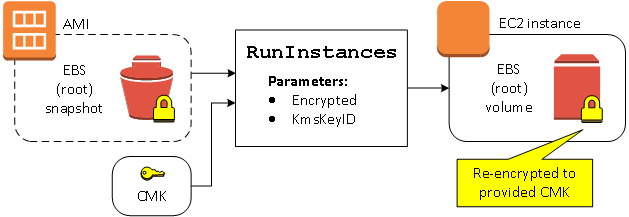
If you own the AMI and supply no encryption parameters, the resulting instance has a volume encrypted to the same key as the snapshot. If the AMI is shared rather than owned by you, and you supply no encryption parameters, the volume is encrypted to your default CMK. With encryption parameters supplied as shown, the volume is encrypted to the specified CMK.
Change Encryption State of Multiple Volumes during Launch
In this more complex example, an AMI backed by multiple snapshots (each with its own encryption state) is used to launch an EC2 instance with a newly encrypted volume and a re-encrypted volume.
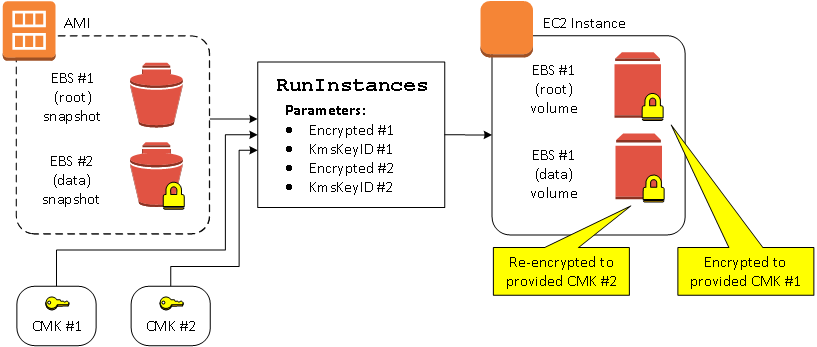
In this scenario, the RunInstances action is supplied with encryption
parameters for each of the source snapshots. When all possible encryption parameters
are
specified, the resulting instance is the same regardless of whether you own the
AMI.
Image-Copying Scenarios
Amazon EC2 AMIs are copied using the CopyImage action, either through the
AWS Management Console or directly using the Amazon EC2 API or CLI.
By default, without explicit encryption parameters, a CopyImage action
maintains the existing encryption state of an AMI's source snapshots during copy.
You
can also copy an AMI and simultaneously apply a new encryption state to its associated
EBS snapshots by supplying encryption parameters. Consequently, the following behaviors
are observed:
Copy with no encryption parameters
-
An unencrypted snapshot is copied to another unencrypted snapshot.
-
An encrypted snapshot that you own is copied to a snapshot encrypted with the same key.
-
An encrypted snapshot that you do not own (i.e., the AMI is shared with you) is copied to a snapshot that is encrypted to your AWS account's default CMK.
All of these default behaviors can be overridden by supplying encryption parameters.
The
available parameters are Encrypted and KmsKeyId. Setting only
the Encrypted parameter results in the following:
Copy-image behaviors with Encrypted set, but no
KmsKeyId specified
-
An unencrypted snapshot is copied to a snapshot encrypted to the AWS account's default CMK.
-
An encrypted snapshot is copied to a snapshot encrypted to the same CMK. (In other words, the
Encryptedparameter has no effect.) -
An encrypted snapshot that you do not own (i.e., the AMI is shared with you) is copied to a volume that is encrypted to your AWS account's default CMK. (In other words, the
Encryptedparameter has no effect.)
Setting both the Encrypted and KmsKeyId parameters allows you to
specify a custom CMK for an encryption operation. The following behaviors result:
Copy-image behaviors with both Encrypted and
KmsKeyId set
-
An unencrypted snapshot is copied to a snapshot encrypted to the specified CMK.
-
An encrypted snapshot is copied to a snapshot encrypted not to the original CMK, but instead to the specified CMK.
Submitting a KmsKeyId without also setting the Encrypted parameter
results in an error.
The following section provides an example of copying an AMI using non-default encryption parameters, resulting in a change of encryption state.
Note
For detailed console procedures to copy an AMI, see Copying an AMI.
For documentation of the CopyImage API, see CopyImage.
For documentation of the command copy-image in the AWS Command Line Interface, see
copy-image.
Encrypt an Unencrypted Image during Copy
In this scenario, an AMI backed by an unencrypted root snapshot is copied to an AMI
with an encrypted root snapshot. The CopyImage action is invoked with
two encryption parameters, including the choice of a CMK. As a result, the
encryption status of the root snapshot changes, so that the target AMI is backed
by a root snapshot containing the same data as the source snapshot, but encrypted
using the specified key. You will incur storage costs for the snapshots in both
AMIs, as well as charges for any instances you launch from either AMI.

The Encrypted parameter alone results in the single snapshot for this
instance being encrypted. Providing a KmsKeyId parameter is optional. If
none is specified, the default CMK of the AWS account is used to encrypt the snapshot
copy. To encrypt the copy to a different CMK that you own, supply the
KmsKeyId parameter.
Note
You can also copy an image with multiple snapshots and configure the encryption state of each individually.