User Profile

Mark-Kashman
Former Employee
Joined Jun 24, 2016


User Widgets
Recent Discussions
ROLLING OUT: SharePoint Online team sites + Office 365 Groups & Pages
Today marks the beginning of bringing the full power of SharePoint to Office 365 Groups, with additional benefits to SharePoint Online all up! New and existing groups will get modern team sites, which come with an updated Home page, the ability to pin items within the new Quick links web part, and to see what's going on in the site via the new Activity web part. These team sites within Office 365 Groups, and existing team sites throughout SharePoint Online, will also have the ability to create publishing pages - fast, easy to author pages that support rich multimedia content, and look great on mobile browsers and via the SharePoint mobile app. Get ready to communicate and share your ideas within SharePoint like never before. Additionally, Microsoft will increase the site collection limit in SharePoint Online to "up to 25TB" (previously "up to 1TB); this will be refelcted in an update to the official "SharePoint Online boundaries and limits" support article. Please review the associated blog on blogs.office.com, "New capabilities in SharePoint Online team sites including integration with Office 365 Groups" with numerous links to new and updated support.office.com articles. Let us know what you think, Mark71KViews81likes207CommentsKeeping up with SharePoint announcements, changes, community ...
Hello SharePoint'ers, A quick FIVE bullets of info to the best places to keep an eye on what is happening throughout the SharePoint of Things #SPoT :smileyhappy: -- news, announcements, futures, help and how to, and community discussions. We want to be loud about cool new tech, ensure good change management, and be deeply involved with valueable public discussions before, during and after you adopt and deploy. Keep engaged - keep us honest. Office 365 Roadmap: http://office.com/roadmap (it's easy to then filter by product - click Filters and select SharePoint listed under the Servcies tab). The official SharePoint blog within blogs.office.com: http://blogs.office.com/SharePoint - this filters all relevant blog posts announcing new innovation, customer case studies and more. And if your a developer, our dev-oriented posts go here: http://dev.office.com/blogs We, too, send corresponding, direct-to-admin Message Center posts to notify Office 365 admins of change management. The @SharePoint Twitter feed: http://twitter.com/SharePoint (we'll always highlight new announcements, let you know about rollout progress, and engage with your questions, feedback and tweets all up). And much of the OneDrive for Business (ODB) news flows through @OneDrive, so keep an eye on that one, too. ODB is built on SharePoint and innovation driven by the same engineering team. Extra credit Microsoft employee Twitter handles tweeting SharePoint (and possibly some other things as these are personal handles; all good to follow (at your own discretion :robotwink:): @jeffteper, @williambaer, @adamharmetz, @danholme, @mkashman, @cmcnulty2000, @reubenk, @omarshahine, and @TheSPMonkey :robothappy:. SharePoint help on support.office.com: https://support.office.com/en-us/article/SharePoint-help-6c06e621-02bb-49d6-8449-509ba36d6e62?ui=en-US&rs=en-US&ad=US (you'll find a ton of help and how to articles written by people who work with our engineering teams to create content to help you adopt and use all aspects of SharePoint (within the Office help site) Right here on the Microsoft Tech Community site: https://techcommunity.microsoft.com/t5/SharePoint/ct-p/SharePoint (we'll engage here around our announcements and answer those deeper questions/concerns you have, and look to you to share your stories, ideas, feedback and more). It takes a village! Open to your suggstions, too, where you find the best SharePoint info/insight - leave links and details in comments. Hope to see you at Ignite 2016, in person at a SharePoint event, or via pixelated 'voice ' on the interwebs. Cheers, Mark20KViews64likes13CommentsUPDATE: SharePoint Online team sites + Office 365 Groups moving beyond First Release
As announced in August, 2016, we are bringing SharePoint Online team sites to Office 365 groups. This change rolled out to First Release tenants in the end of 2016 and is now beginning worldwide rollout. This next phase of the rollout will start Thursday, January 12, 2017, and is expected to complete to customers worldwide in 100% of production by the end of the month. The new SharePoint Online team site home page for an Office 365 group showcases important news, content and site activity. When you create a group, Office 365 gives the group a shared inbox, calendar, OneNote notebook, a Planner for task management—and now, a full-powered SharePoint team site. Each group gets a modern home page—with the ability to create additional pages—document libraries, lists and business apps. The integration of groups and SharePoint team sites means that any time a new team site is created, a new group membership will be created as well. You can easily see the members of the site, if the site is listed as public or private within your organization and how it has been classified. In addition, all existing Office 365 groups will be updated with their own team site. And once the rollout is complete for your tenant, all existing and newly created groups will get a team site by default. Within a group’s team site, this roll out brings a new home page, features News for highlighting important content in the team, and the Activity web part for showing recently active content. These team sites also include our new responsive and powerful page authoring and consumption experience – all connected to the overall Office 365 group experience. There is nothing you need to do but collaborate with your team in a more modern, connected way. Please ask in a reply to this thread if you have any questions. We are pleased to reach this milestone, and here with you along the way. Thanks, Mark74KViews33likes111CommentsUnderstanding security and privacy of Delve and intelligent experiences in Office 365
Within Office 365, Delve is an intelligent service aimed at helping users stay in the know – to discover new, relevant information and people based on who they work with and the content they work on. Delve proactively discovers content across Office 365 and connects users to content and people, intuitively and in a personalized fashion. Powered by the Microsoft Graph, Delve brings you information from across Office 365 – OneDrive for Business, SharePoint Online, Exchange Online, Yammer, Office 365 Video and more. Delve will only show you content that you have access to—it always respects the permissions and security policies of that content. We want to provide insight and clarity for the security and privacy that comes with, and backs, Delve in Office 365. And to be clear about what role the Microsoft Graph plays, examples of how it is used in Delve and throughout Office 365. Security and Privacy Delve is covered under the Office 365 Trust Center and meets all of the requirements of our highest level of compliance which Microsoft refers to as “Tier D” compliance, e.g., ISO 27001 and 27018 certification, SOC 1 and SOC 2 compliance. Delve is also licensed under the Microsoft Standard Online Services Terms which include commitments such as the EU Model Clauses. This, too, applies to the Microsoft Graph - the underlying intelligence service that uses advanced analytics to provide relevant, personalized insights via Delve and other user interface experiences throughout Office 365. You can read more within the public “Office 365 Compliance Framework for Industry Standards and Regulations" document (.pdf). Customers own their Microsoft Graph data, which is stored in their partition of Office 365. The Microsoft Graph data has the same protection and security as other customer data stored in other Office 365 services. Delve never changes any permissions on content or other information. Users only discover what they already have permission to see. Only you can see your private documents in Delve, unless you decide and act to share them. It is important content owners establish and maintain any required or desired access rights and permissions on the content/documents themselves. Documents are not stored in Delve, but rather they are only displayed within the Delve experience from where they are stored, for example OneDrive for Business or a SharePoint Online document library. People can't see each other's private activities, such as what documents they've read, what emails they've sent and received, or what Skype for Business conversations they've been in. People can see when others modify a document, but only if they have access to the same document. What you see when you open Delve is personalized to you, and no one else sees the same files, content, and activity you do. It is possible to opt out of Delve at both the tenant level and the user level. Once opted out, users will not see the Delve tile in the Office 365 app launcher. Opted out users’ document activity (documents they are accessing) is no longer used to help others discover their content. Additionally, various services that surface content and recommendations from the Microsoft Graph to provide intelligence throughout Office 365 will simply not appear. They, too, may revert to previous non-Graph-based methods -- for example, search-based vs graph-based. One example, if you opt out, you would not see the new "Discover" tab within OneDrive for Business - yet the core of OneDrive for Business remains intact. To learn more, please review these two important Delve security and privacy support articles; the first for admins and second for users: "Office Delve for Office 365 admins", "Are my documents safe in Office Delve?". Additionally, it is important to understand permissions levels in SharePoint and other content repositories; examine existing permissions if you perceive any unintended exposure. The Microsoft Graph – supporting the business user and the developer The content, activity, people, and recommendations that surface in Delve and other intelligent experiences are powered by Microsoft Graph. The Microsoft Graph represents a collection of content and people, and the activity that happens across the entire Office suite. From email, social conversations, and meetings, to documents in SharePoint and OneDrive, the Microsoft Graph maps the relationships among people and information, and acts as the foundation for intelligent experiences, providing more relevant and personalized experience to each user. The Microsoft Graph uses sophisticated machine learning techniques to connect people to the relevant content, conversations and people around them. A visual representation of the various content sources and signal Delve and the Microsoft Graph leverage to help make discovery or relevant content and people possible. Review which types of content you can expect to see in Delve. And learn more about the Microsoft Graph. Intelligence beyond Delve, throughout Office 365 and beyond The value of infusing intelligence within Delve, and throughout Office 365 applications, means you have access to intelligent information and insights right where you are working without leaving the app or experience where you are working. You’ll see intelligence in OneDrive for Business in the form of the Discover tab where you’ll find others’ files related to what you are working on. The home page of a SharePoint team site surfaces activities in the site, the SharePoint mobile app and the SharePoint home in Office 365 suggest sites of possible interest and recent activity, plus Outlook’s Focused Inbox, where the Graph helps identify and eliminate clutter in your email stream. Screenshots on web and mobile where the value of intelligence from the Microsoft Graph surfaces throughout the various Office 365 workloads. The effect of opting-out of Delve will reduce the intelligence and discovery experiences in Office 365. It is our recommendation to not opt out. It is also possible to program your own custom solutions for any device with the intelligence from the Microsoft Graph. Developers leverage a single end point that provides access to a common set of simple, modern APIs. Using the Microsoft Graph API, developers can consume Office 365 data in their apps to create custom, personalized experiences for their users. You can learn more about developing with the Microsoft Graph at https://graph.microsoft.io. And the same data access security and privacy model, as articulated above, remains with custom applications that use the Microsoft Graph API. Custom applications querying the Microsoft Graph do so under the security context of the user and will only return content to which the user has been given permissions. Delve and intelligence customer evidence As you move from learning about Delve and the Microsoft Graph, into how you and your company can best introduce the value and capabilities to your users, it’s helpful to review how other companies chose to move forward, helping them to overcome a variety of challenges facing them. Below are two recent examples of companies that committed to putting Delve and the Microsoft Graph to use in production, into their evolving digital workplaces. Marks & Spencer | M&S is a global, multichannel retailer with more than 1,330 stores selling innovative food and quality clothing to people living in many different cultures. They wanted to find a way to unite the company. To promote unity, they sought the right technology tools to support a new business culture— one that is modern, agile, connected and collaborative—that’s defined by a digital mindset across a single global company. Alongside their company portal, serving 80,000 employees, Delve provides intelligent people discovery. “We plugged Delve into our company directory, so employees can look for individuals and see their managers and who they work with. We view Delve as a quick and easy way to find current data to keep us moving at a fast pace in this fast-paced business.” says Carl Dawson, IT Director. Please review the full Marks & Spencer case study + video. Weleda | Based in Arlesheim, Switzerland, Weleda has offices and partnerships in more than 50 countries. They needed to connect employees to the relevant content, conversations, and people around them. By “embedding Delve-like functionality into our intranet, it helps employees stay better connected to the colleagues, information, and projects that mean the most to them,” says Vladimir Filev, Enterprise Architect. Weleda employees are using Microsoft Office 365 to work closely with colleagues worldwide, transforming an email-driven workplace into an inclusive, connected culture that promotes individual achievement to improve global productivity and drive innovation. “Because Delve has such a great search engine,” Filev continues, “I’m able to keep track of contacts and files across multiple projects I’m involved with. In terms of personal time management, I find Delve very helpful.” Please review the full Weleda case study. Intelligence rests on trust Microsoft is committed to security, privacy and compliance. Your data is your data – and it is you who has control of who can see it and who can access it. Through transparent service operations, we seek to gain and earn your trust every day. We are accountable to you. Thanks for keeping us accountable, Mark Additional related resources SUPPORT ARTICLES “Share files or folders in Office 365”: https://support.office.com/en-US/article/Share-files-or-folders-in-Office-365-1fe37332-0f9a-4719-970e-d2578da4941c "Are my documents safe in Office Delve?": https://support.office.com/en-us/article/Are-my-documents-safe-in-Office-Delve-f5f409a2-37ed-4452-8f61-681e5e1836f3?ui=en-US&rs=en-US&ad=US "Office Delve for Office 365 admins": https://support.office.com/en-us/article/Office-Delve-for-Office-365-admins-54f87a42-15a4-44b4-9df0-d36287d9531b “ Understanding permission levels in SharePoint”: https://support.office.com/en-US/article/Understanding-permission-levels-in-SharePoint-87ecbb0e-6550-491a-8826-c075e4859848 BLOGS "Connect to expertise and content with new people experiences throughout Office 365" [9/26/16]: https://blogs.office.com/2016/09/26/connect-to-expertise-and-content-with-new-people-experiences-throughout-office-365/ (this is also the one MS Tech Summits stream on-demand) "Enriching the mobile and intelligent intranet with team news, apps for Android and Windows, and more" [9/26/16]: https://blogs.office.com/2016/09/26/enriching-the-mobile-and-intelligent-intranet-with-team-news-apps-for-android-and-windows-and-more/ "SharePoint - the mobile and intelligent intranet" [5/4/16]: https://blogs.office.com/2016/05/04/sharepoint-the-mobile-and-intelligent-intranet/ “ Today at Connect()—introducing the Microsoft Graph” [11/18/15]: https://blogs.office.com/2015/11/18/today-at-connect-introducing-the-microsoft-graph/ “ Office - Microsoft Graph: Gateway to Data and Intelligence” [Connect 2016]: https://msdn.microsoft.com/en-us/magazine/mt790189.aspx VIDEOS "Discover what's new and what's coming for Office Delve" on-demand BRK2044 session recording: https://myignite.microsoft.com/videos/1359 "Discover what's new and what's coming to the SharePoint Mobile and Intelligent Intranet" on-demand BRK2029 session recording: https://myignite.microsoft.com/videos/1302 "Explore new personalized, intelligence powered search experiences in SharePoint, Delve and Office 365": https://myignite.microsoft.com/videos/1363 "The Mobile and Intelligent Intranet: SharePoint sites and PowerApps": https://youtu.be/x8tgKBXmmPg "Updates to the SharePoint app, team sites and publishing experience": https://youtu.be/W4J6hZtove052KViews18likes20CommentsNEW | Intelligence-powered search, Delve, and Microsoft Graph updates
Office 365 helps you discover new content and people relevant to the work you are doing, in context of where you are working. Alongside existing intelligent experiences like Office Delve, suggested sites in SharePoint home, the 'Discover' tab in OneDrive for Business, your 'Focused Inbox' in Outlook, and more - the search experience is now becoming more intelligent, more personalized; all based on the insights the Microsoft Graph provides to you based on who you work with and what you work on. When you go to find stuff, find it a more intelligent way! To learn more about the new search experience and see it in action, check out the new announcement, "Intelligence-powered search, Delve, and Microsoft Graph updates" within the Delve community blog. Thanks, Mark Kashman, senior product manager3.2KViews13likes1CommentNEW "People Experiences" throughout Office 365
UPDATE: you can now view the on-demand video recording of the "Discover what's new and what's coming for Office Delve" day 1 breakout session from #MSIgnite 2016. Microsoft today is introducing new “people experiences” throughout Office 365. “People experiences” in Office 365 help employees stay in the know – by finding content through people they work with; find and share expertise; and connect with each other in one click – all within context, and within the apps and experiences they already use today. The announcements cover three main offerings: • NEW Delve Windows 10 app for desktop and mobile • Intelligent people cards throughout Office 365 • Updates to Office 365 profile pages Please review the new blog post on blogs.office.com to learn more, “Connect to expertise and content with new people experiences throughout Office 365" and install Delve app for Windows 10 now! :robothappy: Customers are faced with information and document overload. And often the real trick is not what you know, but who you know. And then stretch that a tad more to say it’s really what “they know” that promotes a gain in productivity. “People Experiences” help our customers tap into the power and value of other people – each other – promoting intuitive, proactive knowledge sharing. It helps businesses build a more open, informed and proactive network – one that improves who knows who, and who benefits from what others know. We look forward to hearing what you think, Mark Full URL for the new blog if you need to copy/paste: https://blogs.office.com/2016/09/26/connect-to-expertise-and-content-with-new-people-experiences-throughout-office-365/6.8KViews13likes13CommentsRe: Rollout of SharePoint Communication Sites to First Release?
It is June, and they are coming soon. We can't tell you exactly when, and the update to Filter Panes is a little different scale than introducing communication sites. We're on the final mile of QA and things are looking good. Mr. McNulty set a nice bar, and we'll be clear as to making noise before they come to FR; covers a lot of my to do's this coming month - to launch comm sites so they cannot be missed :-).6.5KViews8likes1CommentRe: The Future of Delve
We certainly understand and know the pain point. We've been focused on enabling good authoring experience, feel we can offer a good team or executive (CxO) style blog with a dedicated communication site + news approach; esp with coming organizational news. But alas, the personal blog alludes explicit. One can publish news often in many locations (to a team site, to a comm site, to a hub site) and the feed of it goes out to people they are related to, even if the person is not active in the site where it gets published, the Microsoft Graph knows the relations and serves up as best a "feed" it can to each user - without requiring that person to "go to someone's blog." That said, the heads are noodling in these areas for sure. One thing you got me thinking about was a way to present all news someone publishes in all places they can, and seeing the feed through the eyes of what the person logged in has permissions to view. So you would see someone's "blog" but only have visibility to the content you're allowed to view. Just thinking out loud. let's loop in John_Sanders who is our news guru these days to review and possibly add some comments; plus Dave Cohen (US) who owns some of these pieces, too. :-)33KViews8likes9CommentsRe: SharePoint Hub Sites due in February for Targeted Release?
Nearing the home stretch for hub sites into Targeted Release. We'll have an announcement blog to inform when we start rollout, plus a webinar, AMA and a fast follow 'planning guide' beyond the main help articles that will publish in parallel with the start of rollout. Hang tight, the team is working thru the last mile of this significant feature. :-) Cheers, Mark.6.3KViews8likes19CommentsRe: ROLLING OUT: SharePoint Online team sites + Office 365 Groups & Pages
The foundational element of both is a SharePoint Online team site. For the modern team site connected to groups, it is adding new fuinctionality (home page, Quick links, Activity, integration with Office 365 Groups, etc.). Today and going forward, any new group gets a site. And coming soon will be the reverse, any new team site gets a group. And today, if you create a new group from within Outlook, that group gets a site. There will be methods from the SharePoint Online admin center where IT/admins can create standalone team sites from the admin console - these wouldn't be connected to Groups. And, existing team sites don't yet have the option to take on the modern home page; this is in the works. You're asking the right questions and we'll have more to say on this next phase of development in/at the Ignite 2016 timeframe.43KViews6likes1CommentRELEASED & UPDATED: SharePoint mobile apps for Windows 10 Mobile, Android and iOS
No matter what device you have in your pocket, you can now stay connected to important content, sites, portals, people and news* from across your intranet while on the go. All the SharePoint mobile apps are now live and fully released to the Windows Store, Google Play Store and App Store! The SharePoint apps are infused with the intelligence of the Microsoft Graph – applied machine learning of activity in Office 365 – to connect you to the relevant information and people around you, throughout Office 365. The SharePoint mobile journey continues, and we wanted to provide you, the community, with a quick update across all SharePoint mobile apps. We wanted to also thank all community members that had a ‘preview’ of their intranet in their pocket. The feedback throughout the beta phases was priceless, colorful, and helpful helping us refine and launch the highest quality apps across the three major platforms. Always be feedbacking is the new motto! RELEASED: SharePoint app for Android in the Google Play Store Like Rick Deckard, you might be a fan of Android. We’ve got you covered – especially when you dream of electric sheep ;). OK, enough Blade Runner analogies (I don’t want Philip K. **bleep** mad at me). We’re pleased to bring you and your Android devices easy access to SharePoint Online sites and portals, giving you a direct connection to the documents you work on or that have been shared with you, rich insights into what is happening around you, and people exploration where content discovery comes alive through the people you work closely with. Install v1.0 today: http://aka.ms/spappandroid! Note: the SharePoint mobile app for Android currently supports SharePoint Online only; a future update will enable support for SharePoint Server on-premises. RELEASED: SharePoint app for Windows 10 Mobile in the Windows Store If you are more Clippy fan than replicant fighter, than we, too, have you covered. The SharePoint mobile app for Windows 10 Mobile helps you navigate SharePoint Online team sites with site activities, links to important sites & portals configured by your organization, open your document libraries with the OneDrive app and then edit your files using Office mobile apps like Word, Excel, PowerPoint and OneNote, perform an enterprise search and keep connected with the people you work with and discover what they are working on. Install v1.0 today: http://aka.ms/spappwindows! Note: the SharePoint mobile app for Windows 10 Mobile currently supports SharePoint Online only; a future update will enable support for SharePoint Server on-premises. UPDATED: SharePoint app for iOS in App Store gets a new News tab That bite of Apple got a hold on you? If you use the SharePoint app on iOS, you get the first look at the personalized, mobile experience of team news. When you tap the News tab, you will see a list of aggregated news using the intelligence of the Microsoft Graph from the sites you work in, the sites you follow and the sites your colleagues work in. That’s your news and your intranet in your pocket! Install or update v2.0 today: http://aka.ms/spappios! Note: News will only show up in the SharePoint mobile app for iOS if the ‘team news’ feature is available and in use within your Office 365 tenant – currently we are rolled out to ~ 50% of our First Release customers. Learn more We, too, published several Help articles on support.office.com. Learn more about SharePoint mobile app for Android, SharePoint mobile app for Windows 10 Mobile, and SharePoint mobile app for iOS. We hope you like the SharePoint apps and find them useful as a daily productivity driver in your pocket. Thanks, Mark *The personalized news feature is iOS only now, and planned for other platforms in the future.9.8KViews6likes8CommentsRe: SharePoint News Connector in Microsoft Teams and Hub Sites
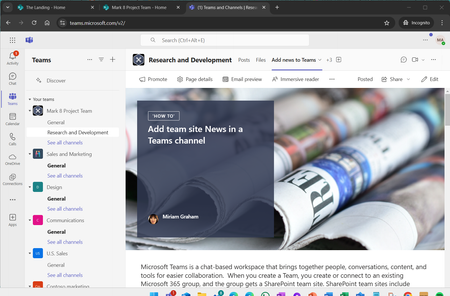
Good feedback, and will channel it to the team that is working on "company news" and our GPM who manages the work schedule with the MS Teams team. One feature coming that we shared was the ability to add a page or news as a tab in Teams - and in this case, you can bring in any news article, not just one from the connected team site; so long as Team members have permissions to view the page/news that was added a tab in their Teams channel.5.6KViews5likes1CommentRe: ROLLING OUT: SharePoint Online team sites + Office 365 Groups & Pages
First main diff to consider is that Office 365 Groups creates an object in Azure Active Directory (AAD), where it can then support auth across apps more easily. Next I'd say we are using the best of all apps. For example: Calendaring and mail are best offered via Exchange Online - and Office 365 Groups uses EXO to provide the group with a shared cal and inbox; and improvement over SharePoint calendars and site mailboxes. We do use SharePoint Online for the Group's notebook, document library (Files) and now the site itself for pages, lists, subsites and biz apps. And beyond these examples, Groups brings access to Planner, Power BI, Skype for Business, etc.. with much easier integration and permisisons management. Initial thoughts. Hope it helps. - Mark.6.6KViews4likes1CommentRe: ROLLING OUT: SharePoint Online team sites + Office 365 Groups & Pages
At a platform level, both new and existing team sites are the same. The main difference is that team + groups comes with the new home page, the Quick Links and Activity modern web parts and the integration with Office 365 Groups for Files and Site within the apps Office 365 Groups provides membership to (the others being Conversations, Calendar, Notebook, Planner, etc.). We are working at wiring up all Groups entry points - the big one for us is the SharePoint home, where you create a new subsite today, soon you will generate a unique site collection connected to Office 365 Groups. This is already in place for other entry points - like from within Outlook. It is still possible to create a default team site from the Sharepoint Online admin center. These wouldn't have a connection to Office 365 Groups. At the Ignite 2016 conference (end of Spet.2016), we'll have more to share for what it means for existing team sites to add access and control with Office 365 Groups membership, plus bringing the new home page and modern web parts. Thanks, Mark43KViews4likes19CommentsRe: Product Spotlight: Delve
+1, Naomi Moneypenny as FYI :-). Delve is a great guide to the content divide that exists over time and augments the productivity workstreams we all engage in under the weight of exponential content and data growth - and yes, we're always interested in fededback, explicit and implicit, that helps refine the experience and certainly own up to making it accurate and safe.7.2KViews4likes0CommentsAnnouncing Office Delve for Windows 10 Preview
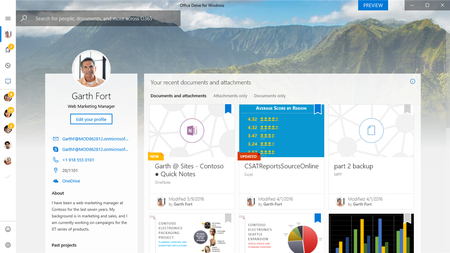
We’re pleased to announce that a Preview of the Office Delve for Windows 10 app is now available. Once you download the app, use your Office 365 work or school account to sign in and see what Delve can help you discover about the content and people around you in your organization – right from your Windows 10 desktop. Delve helps you stay in the know, powered by who you know and what they are working on. With this preview app for Windows 10, you’ll be notified about document updates, and get document suggestions that are relevant to your work. You can also find people and get back to your recent documents and attachments, all in one place – all in one app. Key features: •Get updates about what your colleagues are working on •Find relevant documents and attachments based on people you know •Get back to important documents you're actively working on In Delve, you can only see content that you already have permission to access. This means your colleagues won't see your private documents, and you won't see theirs. Note: support for Windows 10 phone will be added at a later date. This version only supports Windows 10 PCs and tablets. How do I get the Office Delve for Windows 10 Preview app? You can only use this app with an Office 365 work or school account that has Office Delve enabled by your Office 365 admin. Please follow this link to download the preview. As always, we appreciate and thank you for your feedback. Please keep the good ideas coming, we look forward to hearing from you. Cheers, The Office Delve Team1.3KViews4likes2CommentsRe: New "Site Pages" feature in O365 Team Sites conflicting with Publishing feature
Hi Enric, You got the right channel; a perfect use of the MS Tech Community - SharePoint. :-) The new, modern publishing pages don't use the classic publishing infrastructure, and the team is aware of the conflict and is working on a plan to mitigate how modern & classic interact when used in the same site. I'll loop back with the team that was working on this fix, but for the mean time, if a site has the publishing infra turned on already, then you would not see modern pages yet; and if you have modern team site, you cannot activate the publishing infra (as you experienced). A current method you could employ is to create a site collection from within the SPO admin center. This will create a classic site, of which you then should be able to activate the classic publishing feature. And for sites that do not require classic publishing, you can continue to use "Create site' from SharePoint home, Outlook, Planner - wherever you can create an Office 365 Group, that group gets a modern team site. Hope that helps, and know the team is working on a way to resolve the classic and modern publishing side by side. Thanks, Mark9.4KViews4likes8CommentsRe: Delve is now showing under eur.delve.office.com
We're working to standardize the entry point for Delve to delve.office.com that has smarts in how it resolves, and showcases the next evolution of how we are personalizing the graph tied and driving the UI/UX. It is slowly rolling out and we are hearing from a few folks that the experience is good, but different - though know the intelligence behind it is the same - the Microsoft Graph - showcasing what is import for 'me' to discover based on people that I work with and the content they and I work on.3KViews4likes3CommentsCorp Comms + Viva related episode of The Intrazone podcast
:new_button: #TheIntrazone episode, "Viva Connections adoption best practices" - We talk with LizSundet and Luis Enrique Torres about the common patterns when assessing, planning, and deploying your 'gateway to the overall employee experience' - aka: Adoption excellence. Blog + audio :page_with_curl::studio_microphone:️ https://techcommunity.microsoft.com/t5/microsoft-sharepoint-blog/viva-connections-adoption-best-practices-the-intrazone-podcast/ba-p/3903883



Recent Blog Articles
Post-publication impact of SharePoint pages - New episode of The Intrazone podcast
Take an audio tutorial tour that covers 10 ways to make a SharePoint pages work for you, after you publish them! After your page looks great and is ready for your audience… make a plan to put th...952Views0likes1Comment